Pros
- Good value for light everyday use.
- 15.5-inch 1080p anti-glare screen.
- Backlit keyboard and webcam included.
- Useful port mix for basic desk setups.
This ASUS 15.5-inch laptop fits best for a student, home office, or travel bag buyer who wants a simple Windows 11 machine with a full HD screen, backlit keyboard, webcam, and enough ports to cover everyday work without extra accessories. The draw is clear: it keeps the essentials in one place and stays in the affordable, no-frills lane. The trade-off is just as clear, with 4 GB of RAM and a Celeron N processor putting it in basic-use territory rather than heavy multitasking.
Buy it if your day is mostly browser tabs, documents, video calls, and light streaming, and you value a larger 15.5-inch display plus a numpad-style typing setup. Skip it if you need lots of local storage headroom, sustained speed, or a machine that can absorb heavier app loads without slowing down. For the right buyer, it is a practical budget clamshell; for the wrong one, the memory ceiling and modest processor turn into the whole story.
| Screen Size | 15.5 Inches |
|---|---|
| Resolution | 1920 x 1080 pixels |
| Processor | Celeron N |
| RAM | 4 GB |
| Storage | 256 GB |
| Ports | 1x HDMI, 1 x USB Type C, 2 x USB Type A, 1x Headphone/Microphone Combo Jack |
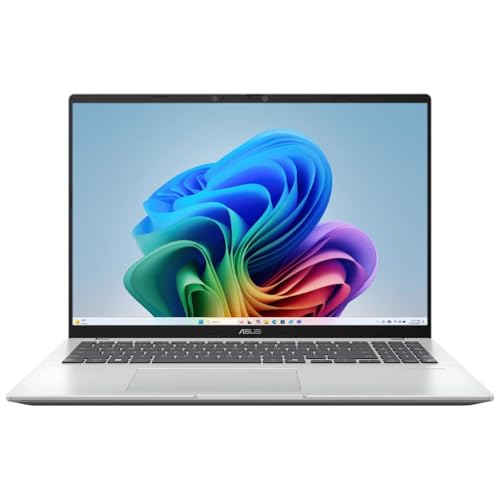
The 15.5-inch Full HD IPS anti-glare display is the part most buyers will notice first, because it sets the tone for reading, browsing, and video calls.
On a screen this size, 1920 x 1080 keeps text and menus usable without making the laptop feel oversized for desk work. The anti-glare finish is especially useful in bright rooms, since it reduces the chance that lighting becomes part of the problem.
The confirmed port set includes HDMI, USB-C, two USB-A ports, and a headphone/microphone combo jack.
That mix matters because it covers the common daily path: a monitor at home, a flash drive or mouse, and wired audio when needed. It is a practical setup for a budget laptop, but not a generous one, so buyers with several accessories at once may still feel the limits.
The Celeron N processor, 4 GB of DDR4 memory, and 256 GB of storage define the laptop’s comfort zone.
This is enough for light schoolwork, web use, and simple office tasks, which is why the price-to-capability story can work. The same trio also explains the ceiling: once tabs, downloads, and background apps pile up, the machine belongs to the “keep it simple” category rather than the “push it hard” category.
The backlit keyboard, integrated webcam, Windows 11 Home, Bluetooth, and included ASUS AC charger round out the package.
These features do not make it premium, but they do make it easier to live with on a normal day. Backlighting helps in low light, the webcam supports calls, and the included charger removes one immediate extra purchase. The trade-off is that these comforts sit on top of modest core hardware, so they improve convenience more than raw speed.
On a desk, this laptop makes the first decision easy: the 15.5-inch FHD panel gives you enough room to read, write, and keep a couple of windows open without feeling cramped. The 1920 x 1080 resolution on a screen this size lands in a comfortable everyday zone, not a premium one, and that matters more here than the brand name on the lid. If your routine is documents, email, and a few browser tabs, the screen size and anti-glare finish make the setup feel sensible right away.
The keyboard-and-ports mix is where the machine earns its keep for daily use. A backlit keyboard helps in dim rooms, and the confirmed HDMI, USB-C, two USB-A ports, and combo audio jack cover the normal plug-in routine without forcing a dock on day one. That is a real convenience for school or home office work, especially with a charger included. The limitation is that this is still a basic layout for basic work; once you start juggling more devices or more demanding software, the 4 GB memory ceiling becomes the part that changes the experience fastest.
The strongest warning sign is sustained speed, not simple setup. The Celeron N processor and 4 GB of RAM place this in the light-duty lane, and the review pattern matches that: some owners are happy with it for simple tasks, while others run into sluggishness and storage pressure once the workload grows. With 256 GB advertised and a renewed configuration in the mix, this is not the kind of laptop I would pick for large downloads, heavier multitasking, or long sessions with many apps open. For mobility, the 15.5-inch size also means convenience comes from the charger-and-screen balance, not from ultra-light portability.
Community
The pattern is straightforward: people who keep expectations modest tend to like this laptop, especially when the price and basic usability matter more than power. The complaints cluster around sluggishness, limited memory, and a battery that does not always go far enough, which makes the machine feel best as a simple everyday companion rather than a do-everything notebook.
Excellent product, works well and for price, hard to beat.
It's sleek, lightweight, and I love that it has a backlit keyboard. I wish there were more than 2 USB ports, but it's not a big deal.
Very nice, works very well and is reasonably priced.
Had to get a new laptop before Windows 10 dies out. This has been a good laptop so far.
| Attribute | ASUS 15.5 Current | HP TPN-Q221 | Auusda T156A |
|---|---|---|---|
| Price | 219.99 USD | 229.99 USD | 299.99 USD |
| Screen Size | 15.5 Inches | 14 Inches | 15.6 Inches |
| Resolution | 1920 x 1080 pixels | 1366 x 768 pixels | 1920 x 1080 Pixels |
| Processor | Celeron N | Intel Quad-Core N4120 | Intel Mobile CPU, 4-core, up to 3.4 GHz |
| RAM | 4 GB | 8 GB | 16 GB DDR4 |
| Storage | 256 GB | 64 GB eMMC | 1 TB NVMe SSD |
| Ports | 1x HDMI, 1 x USB Type C, 2 x USB Type A, 1x Headphone/Microphone Combo Jack | 1 x USB Type-C, 2 x USB 3.1 Type-A, 1 x HDMI, 1 x RJ-45, 1 x Headphone/Mic Combo | - |
| Editorial score | 70/100 | 71/100 | 75/100 |
Against the Lenovo Newest Flagship Lenovo Chromebook, this ASUS makes more sense if you want Windows 11 Home, a larger 15.5-inch display, and a more traditional laptop setup for general home or school use. The Chromebook route is cleaner if your work lives almost entirely in the browser and you want a simpler, lighter platform, but the ASUS is the better fit when you want Windows compatibility and a fuller port set with HDMI and USB-A included.
Compared with the HP TPN-Q221, the ASUS trades up in screen size and resolution while staying in the same basic-laptop lane. The HP’s 8 GB of RAM gives it more breathing room for multitasking, so it is the safer pick if you keep more apps open at once. Choose the ASUS when display comfort and a straightforward everyday setup matter more than extra memory; choose the HP when responsiveness under load matters more than screen size.
The UOWAMOU BTC501 is the closest shape match, but that machine is positioned with far more RAM, which changes the whole feel of the category. If you want the cheapest route into a simple 15.6-inch work laptop, the ASUS is the more restrained buy; if you want a more ambitious spec balance for heavier multitasking, the UOWAMOU style of configuration is the stronger route. The ASUS wins on straightforwardness, not on headroom.
For a budget Windows laptop, this ASUS gets the important basics right: a roomy 15.5-inch Full HD anti-glare screen, a usable port mix, a backlit keyboard, and enough convenience features to make it easy to live with. If the current offer is attractive, it is a sensible pick for school, home, or travel use when your workload stays light and you want a straightforward machine rather than a performance gamble.
The reservation is also clear: 4 GB of RAM and a Celeron N processor keep this from being the right choice for buyers who want speed under pressure, broad multitasking, or lots of local storage breathing room. If that is your reality, step up to a better-equipped alternative; if not, this one earns its place as a practical value buy.
Does it handle heavier multitasking well? No, the 4 GB RAM and Celeron N processor keep it in the light-use lane, so it is better for simple everyday tasks than for loading up lots of apps at once.
With Celeron N, 4 GB, 256 GB, it looks best suited to office work, web use, streaming, and other everyday tasks based on the listed specs. If you need heavier workloads, compare performance, cooling, and software requirements more closely.