Review Laptops Acer

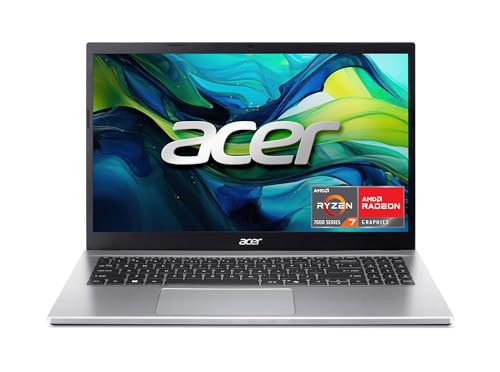
Acer Aspire Go 15 Slim Laptop - Review and opinions

Acer Aspire Go 15 Slim
75 /100 Overall

Quick recommendation

Value for money 78/100
Ease of use 74/100
Durability 64/100
Customer reviews 84/100

Is it worth it?

The Acer Aspire Go 15 Slim fits a buyer who wants a light, everyday Windows laptop for browsing, documents, streaming, and school or home office work without paying for extra muscle they will not use. Its 15.6-inch Full HD IPS screen, Core i3-N305 chip, 8GB of LPDDR5 memory, and 128GB onboard storage set it up for basic daily tasks, while the slim build and Wi-Fi 6 keep it aligned with portable use. The clearest trade-off is storage headroom and long-term comfort under heavier workloads.

This is a sensible pick for light office work, travel, and general home use if you value a compact 15.6-inch layout and a straightforward setup path. Skip it if you need roomy local storage, sustained multitasking, or a machine that leaves more performance margin for demanding apps. The buying case is strong for everyday use, but the 128GB storage ceiling and entry-level platform keep it in the practical, not ambitious, lane.

Screen Size 15.6 inches
Resolution 1920 x 1080 pixels
Processor Intel Core i3-N305
RAM 8 GB LPDDR5
Storage 128 GB Universal Flash Onboard Storage
Wireless Wi-Fi 6

Key features

Everyday speed for light work

The Core i3-N305, 8GB LPDDR5 memory, and 128GB onboard storage define this as a basic productivity machine rather than a power laptop.

That combination matters because it keeps common tasks moving without making the price feel wasted on performance you will not use. The ceiling is clear, though, so this is best for browser work, documents, streaming, and simple multitasking rather than heavy creative apps or large local files.

Screen comfort in a usable 15.6-inch format

The 15.6-inch Full HD IPS display gives you a familiar large-screen layout with 1920 x 1080 resolution.

That matters for reading, watching, and split-window work because the panel is sharp enough for everyday text and media without pushing the laptop into a bulky category. It is a practical screen for a student or home user, with the usual trade-off that it is built for comfort and clarity, not premium display ambition.

Ports that make a small laptop easier to live with

USB-C charging and DisplayPort support, two USB-A ports, HDMI 2.1, and a headphone jack give the Aspire Go 15 Slim a more flexible desk setup than many entry models.

That matters because you can connect a monitor, charge through USB-C, and still keep room for accessories without leaning on adapters. For a buyer who moves between a couch, a desk, and a classroom, that flexibility is a real convenience rather than a spec-sheet bonus.

User experience

Open it on a desk for email, browser tabs, and a document or two, and the Aspire Go 15 Slim lands in the lane it was built for. The 15.6-inch 1080p IPS panel gives enough room for side-by-side windows without making the chassis feel oversized, and the light, slim design makes it easy to move from room to room. The practical upside is simple: this is a laptop that stays comfortable for ordinary work, not one that demands a big desk or a power-user mindset.

For writing and viewing, the confirmed screen size and resolution matter more than the marketing language around AI. A 15.6-inch Full HD panel works out to roughly 141 pixels per inch, which is a sensible middle ground for text, streaming, and casual browsing. That keeps the image sharp enough for everyday use, while the 8GB memory and 128GB storage put a clear limit on how far you can stretch into heavier multitasking or large local libraries. The trade-off is easy to understand: it feels right for a streamlined daily routine, but not for someone who keeps everything open at once.

The port mix also makes the workday feel more complete than the price might imply. You get USB-C with charging and DisplayPort support, two USB-A ports, HDMI 2.1, and a headphone jack, so a dock, a monitor, a mouse, and headphones can all live in the same setup without much fuss. That matters because the laptop can serve as a travel machine during the day and a desk machine at night. The only real caution is storage pressure, since 128GB fills quickly once apps, updates, and media start piling up.

Battery and mobility round out the picture. The product is positioned with extended productivity in mind, and the recurring buyer takeaway is that it works best when you want something easy to carry, easy to start using, and not fussy about the basics. The 720p webcam with low-light processing and noise reduction also makes it believable for calls, even if this is still an everyday laptop rather than a content-creation machine. The result is a clean fit for commuting, school, and home use, with performance limits that show up first when the workload gets ambitious.

Pros

  • Slim and easy to carry for room-to-room or travel use.
  • Full HD IPS screen is a comfortable size for everyday browsing and streaming.
  • USB-C charging plus HDMI and two USB-A ports make desk use flexible.
  • Good value positioning for light productivity and school tasks.

Cons

  • 128GB storage leaves little room once apps, updates, and files accumulate.
  • Entry-level performance is not the right match for heavy multitasking or gaming.
  • Budget build expectations are part of the deal, so long-term durability is less certain than on pricier laptops.

Community

User reviews

The strongest praise centers on easy setup, good value, and a size that works well for everyday carry. The main disappointment is not the basic experience itself, but the limits that come with an entry-level build: storage fills fast, the platform is not for demanding work, and long-term confidence depends on how much wear you expect from a budget laptop.

Chazz

This is one of the best PC laptops in the low a price band around 200 USD range.

Moodies

I ran a CPU benchmark and was impressed with how smoothly it handled light-duty use.

Colin

The screen is wonderful, the setup was fairly painless, and it does not feel cheap for the price.

User

I was looking for an upgrade and slimmer laptop, and I find the quality and performance good so far.

Comparison

Attribute Acer Aspire Go 15 Slim Current Acer Aspire 3 A315-24P-R7VH NIMO N151 HP TPN-Q221
Price 369.99 USD 340.22 USD 399.99 USD 229.99 USD
Screen Size 15.6 inches 15.6 Inches 15.6 Inches 14 Inches
Resolution 1920 x 1080 pixels 1920 x 1080 pixels 1920 x 1080 pixels 1366 x 768 pixels
Processor Intel Core i3-N305 AMD Ryzen 3 7320U Quad-Core Intel Pentium Quad Core N100 Intel Quad-Core N4120
RAM 8 GB LPDDR5 8 GB LPDDR5 16 GB 8 GB
Storage 128 GB Universal Flash Onboard Storage 128 GB NVMe SSD 1024 GB 64 GB eMMC
Wireless Wi-Fi 6 - Wi-Fi 6, Bluetooth 5.2 -
Editorial score 75/100 74/100 74/100 71/100

Against a Chromebook or very basic web-first laptop, the Aspire Go 15 Slim makes more sense if you want full Windows compatibility, USB-C display output, and a more traditional desktop-like setup. Choose the simpler web-first route only if all you need is browser work and you want the lightest possible software overhead. Choose this Acer if Windows apps, a larger 15.6-inch screen, and more flexible ports matter more than absolute simplicity.

Compared with a more capable mainstream 15-inch laptop, this model gives up storage room and performance headroom in exchange for a lower-cost, lighter-feeling everyday machine. That makes it a better fit for email, schoolwork, and streaming than for heavy multitasking or long-term media hoarding. If your day revolves around documents, tabs, and calls, it is the cheaper route that still feels properly equipped; if you regularly push many apps at once, step up to a stronger class.

If you are looking at a budget Windows notebook from Acer, this one lands in the practical middle: more flexible than a stripped-down cloud-first machine, but clearly less ambitious than a performance-oriented 15-inch laptop. The 15.6-inch Full HD screen, Wi-Fi 6, and usable port mix keep it competitive for everyday life, while the 128GB storage and Core i3 platform keep the buying decision grounded in modest expectations.

Conclusion and verdict

The Acer Aspire Go 15 Slim is a good buy for someone who wants a lightweight Windows laptop for everyday work, streaming, and travel-friendly use. The screen size, Full HD IPS panel, Wi-Fi 6, and practical port selection make it easy to live with, and the value case is strongest when you stay in the light-productivity lane and check the current offer before you buy. If you need more storage, more performance, or a machine that feels built for heavier workloads, this is not the right step up. The 128GB ceiling and entry-level Core i3 platform are the real boundaries here, so the best buyer is the one who wants a simple, portable daily laptop and is happy to keep expectations modest.

Still, compare Acer Aspire Go 15 Slim with close alternatives if warranty, noise, real battery life, or included accessories are decisive for you.

FAQ

Is it good for school and office work?

Yes, it is well suited to documents, browser tabs, streaming, and routine Windows tasks.

Can it handle a desk setup with external accessories?

Yes, USB-C charging, HDMI 2.1, two USB-A ports, and a headphone jack make that easy.

Jake Miller

About the author

Jake Miller

As a passionate tech enthusiast, I review the latest PCs, laptops, and hardware components. With detailed tests and honest insights, I aim to help users build or buy the perfect setup for their needs.