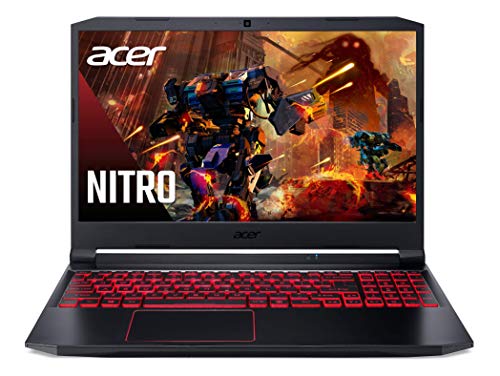
Review Laptops Lenovo

Lenovo LOQ 4050 Laptop - Review and opinions

Price in usual range
See on Amazon
Price and availability checked on
80 /100 Overall

Score

Portability 58/100
  • 15.6-inch gaming chassis with no stated weight or battery-life claim
  • The gaming-focused thermal behavior favors desk use over lap or travel use
Display comfort 75/100
  • Resolution: 1920 × 1080 · FHD
  • Brightness: 300 nits
  • Refresh rate: 144 Hz
Input quality 68/100
  • Webcam: webcam
Sustained performance 82/100
  • Processor: AMD Ryzen 5 7235HS
  • RAM: 16 GB · DDR5
  • Storage: 512 GB · SSD
Battery and ports 80/100
  • Ports: USB-C · USB-A · HDMI · RJ-45 · Audio
  • Wireless connectivity: Wi-Fi 6
  • Ethernet
Customer reviews 81/100

Quick verdict

The key question with the Lenovo LOQ 4050 is whether you want a real gaming route around the $1,000 class or a quieter, lighter everyday laptop. Its GeForce RTX 4050 6GB, 144Hz 1080p IPS display, 16GB of DDR5 memory, and Ryzen 5 7235HS give it a credible performance-first identity, while the trade-off is clear: gaming brings heat and fan noise, and the 15.6-inch chassis is better suited to a desk than a commute.

Buy this Lenovo if occasional or regular 1080p gaming, a high-refresh screen, wired networking, and Windows compatibility matter more than silent operation or all-day mobility. Skip it if you need a cool lap machine, a bright screen for demanding creative work, or a clearly documented battery-led travel laptop. The configuration is compelling because the GPU is not an afterthought, but the thermal behavior changes where and how comfortably you will use it.

Screen size 15.6 inches
Resolution 1920 x 1080 pixels
Processor AMD Ryzen 5 7235HS
RAM 16 GB DDR5
Storage 512 GB SSD

Gaming-first performance

The dedicated RTX 4050 and 144Hz G-SYNC display give this laptop a clear purpose beyond basic office work.

That combination favors buyers who want smoother motion and modern game compatibility at 1080p, while the Ryzen 5 processor and 16GB RAM keep the rest of the system balanced for everyday software.

Desk-ready connectivity

Ethernet, HDMI, three USB-A ports, USB-C, Wi-Fi 6, Bluetooth 5.2, and a headset jack make a multi-device setup straightforward.

A gaming desk can accommodate wired networking and an external monitor without the adapter chain that often undermines laptop convenience.

Screen comfort with a brightness trade-off

The IPS panel is anti-glare, non-touch, and rated at 300 nits, with 1920-by-1080 resolution across 15.6 inches.

That works well for games, streaming, and ordinary documents, but the brightness complaint matters if the laptop will spend its life near a sunny window or handle brightness-sensitive creative work.

Performance and experience

Put it on a desk for a game after work and the hardware choices make sense together. The RTX 4050 supplies dedicated graphics with 6GB of GDDR6 memory, while the 144Hz FHD IPS panel gives fast-moving games a more responsive presentation than a basic 60Hz office screen. The 1080p target also keeps the display and GPU pairing practical rather than chasing an unnecessarily demanding resolution. The catch is physical comfort: one buyer describes the fans as loud during gaming, and another reports that the underside becomes very hot after a 30-to-40-minute session. This is a plugged-in desk gaming laptop, not a lap-first design.

Start a normal work or study session and the 16GB of DDR5 RAM plus a 512GB SSD give the machine a sensible base for browsers, documents, messaging, and installed games. Windows 11 Home removes the compatibility barrier that can complicate some cheaper alternatives, and the backlit keyboard is useful when the room is dim. Storage is the first practical compromise: 512GB is comfortable for everyday software, but several large games can consume it quickly. The result is a strong starting configuration for mixed use, with future storage pressure more relevant than memory pressure.

At the back of a desk, the port selection avoids the most common gaming-laptop adapter problem. Three USB-A ports, one USB-C port, HDMI, Ethernet, and a headset combo jack cover a mouse, keyboard, external display, wired network, and audio without immediately forcing a hub. Wi-Fi 6 and Bluetooth 5.2 also suit a flexible home setup. The 15.6-inch 1080p image works well for general viewing, but the stated 300-nit brightness and one buyer’s complaint that the screen could be brighter make strong daylight or color-critical work a weaker fit. For calls, the configuration does not establish webcam or microphone quality, so this is easier to recommend as a gaming and home-use system than as a meeting-first computer.

Pros

  • Dedicated RTX 4050 graphics with 6GB of GDDR6
  • 144Hz FHD IPS display with G-SYNC
  • 16GB DDR5 RAM and a 512GB SSD make a balanced everyday and gaming base
  • Ethernet, HDMI, USB-C, and three USB-A ports support a full desk setup.

Cons

  • Gaming sessions can make the underside very hot
  • Fan noise is noticeable during gaming
  • The 300-nit screen may feel too dim in bright rooms
  • 512GB of storage can fill quickly with a large game library.

Community

User reviews

The overall ownership picture is favorable for the price and gaming purpose, with smooth performance and complete delivery standing out as the main positives. The recurring practical warning is that gaming heat and fan noise are part of the package, while the display may not satisfy buyers who prioritize high brightness.

Lilly

★ ★ ★ ★ ★

I bought it for general use and occasional gaming, and it has not disappointed. It heats up quickly and the fan gets loud during games, but I see that as the cooling doing its job.

Daycia Gray

★ ★ ★ ★ ★

I waited to use the PC before writing. It arrived on time with the box intact, in perfect condition, and nothing missing, and the performance and graphics are great for the price.

Barbara Murray

★ ★ ★ ★ ★

It looks and works as expected, but the screen could be brighter and the bottom gets very hot after 30 to 40 minutes of gaming. I have had no lag or problems from the RAM, GPU, or CPU.

MJ

★ ★ ★ ★ ★

I use it with my PS5 and for iRacing.

Comparison

Attribute Lenovo LOQ 4050 Current ASUS TUF Gaming A16 Acer Nitro V KAIGERR S16
Price $1,044.50 $1,029.00 $921.19 $899.99
Screen size 15.6 inches 16 inches 15.6 inches 16 inches
Resolution 1920 x 1080 pixels - 1920 x 1080 pixels 1920 x 1200 pixels
Processor AMD Ryzen 5 7235HS - Intel Core i5-13420H -
RAM 16 GB DDR5 16GB DDR5 8 GB DDR5 24GB DDR5
Storage 512 GB SSD 512GB SSD 512 GB PCIe Gen 4 SSD 512GB NVMe SSD
Editorial score 80/100 80/100 78/100 69/100

Against the HP OmniBook 7 AI 17.3, the Lenovo chooses gaming capability over a larger viewing area and higher memory capacity. The HP’s known configuration includes a 17.3-inch 1920-by-1080 display, an Intel Core Ultra 7 258V, and 32GB of RAM, making it the more natural lane for large-screen office work and heavier multitasking. Choose the Lenovo when the RTX 4050 and 144Hz refresh rate change the purchase; choose the HP route when display size and memory headroom matter more than dedicated gaming graphics.

The Dell DC16251 offers a 16-inch 1920-by-1200 display, an Intel Core 7 processor, and 16GB of RAM, so it is the better-shaped alternative for buyers who value extra vertical workspace for documents. The Lenovo remains the more direct performance choice because its dedicated RTX 4050 and high-refresh panel address gaming first. Lenovo’s own V15 G4 ABP is another contrasting route, with a Ryzen 7 7730U and 40GB of RAM at the same 15.6-inch 1920-by-1080 resolution, but its known configuration is more attractive for memory-heavy office use than for a gaming buyer who needs dedicated graphics.

Compare with Compare this model This product stays fixed; add a recommended alternative or search another model in the category.

Compare with

Add a second model to activate the direct comparison.

Is the Lenovo LOQ 4050 laptop worth it?

The Lenovo LOQ 4050 earns its place when the goal is affordable 1080p gaming with enough everyday flexibility for school, home, or general work. The RTX 4050, 144Hz IPS panel, 16GB DDR5, Windows 11, and broad port selection solve the core gaming-laptop problem without requiring a separate graphics machine. Check the current offer if those priorities match your budget, especially while the 512GB SSD remains sufficient for your library. The skip rule is equally straightforward. Choose another route if quiet operation, bright-screen work, long unplugged sessions, or comfortable lap use matters more than GPU performance. The reported heat and fan noise are not minor details for those buyers, and the screen’s 300-nit ceiling makes this a less convincing creative or bright-room machine than a display-first laptop.

See the best price on Amazon Check for today's deals. Free shipping with Prime.

FAQ

Is this laptop better for gaming or office work?

It is best for mixed use with gaming as the priority, because the RTX 4050, 144Hz display, G-SYNC, and Ethernet are more distinctive than its office features.

Can it replace a desktop gaming setup?

It can serve as a compact desk gaming system with HDMI, Ethernet, multiple USB ports, and dedicated graphics, but heat and fan noise make a raised desk setup more suitable than lap use.

Editorial team

PC Gear Reviews editorial team

The PC Gear Reviews editorial team reviews product specs, prices, availability, visible customer feedback, and buying signals to keep reviews useful and up to date.

Review published on