RAM
40 GB
RAM
The Lenovo V15 G4 ABP raises a specific value question for home offices and small businesses: does 40GB of RAM and a 1TB SSD make this a better work machine than a more polished mainstream laptop? Its Ryzen 7 7730U, Windows 11 Pro, numeric keypad, Ethernet, HDMI, and large storage allocation create a practical desk-first setup for documents, browser-heavy work, online classes, and general business use. The trade-off is equally clear: the 15.6-inch 1080p screen has drawn criticism for washed-out color and limited viewing comfort, while the USB-C port may also serve as the charging connection, reducing flexibility for docks and displays.
Buy it for a fixed desk, home office, or business fleet where memory, storage, wired networking, and a full numeric keypad matter more than a premium screen or all-day unplugged mobility. Skip it if you need dependable long battery sessions, strong color work, a backlit keyboard, or a clearly supported upgraded-memory platform. The performance package is unusually generous for ordinary productivity, but the display and charging arrangement keep this from being an easy recommendation for every buyer.
| Screen size | 15.6 inches |
|---|---|
| Resolution | 1920 x 1080 pixels |
| Processor | AMD Ryzen 7 7730U |
| RAM | 40 GB |
| Storage | 1 TB |
The Ryzen 7 7730U paired with 40GB of RAM and a 1TB NVMe SSD is the defining buying reason.
It gives office work, study software, browser-heavy routines, and light creative or gaming use plenty of room before storage or memory becomes the immediate bottleneck. The integrated Radeon graphics keep the route centered on everyday use rather than demanding modern gaming or professional GPU work.
HDMI, RJ45 Ethernet, three USB ports, Bluetooth, Wi-Fi, and the headset combo make this practical for a home-office station or wired business network.
The useful port count is tempered by the single USB-C connection and its reported charging role, so docking and external-display setups may need an adapter.
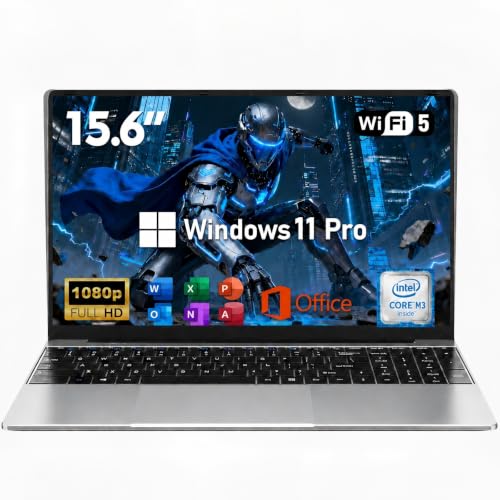
The 15.6-inch FHD display and dedicated numeric keypad favor spreadsheets, forms, and document work over compact travel.
The keypad adds genuine office value, while the non-touch, non-backlit configuration and mixed color and viewing feedback make the screen and keyboard less appealing for buyers seeking a more refined daily interface.
Start the morning with a browser full of tabs, a spreadsheet, messaging, and a document open, and this configuration has the right shape for avoiding the usual memory squeeze. The eight-core, 16-thread Ryzen 7 7730U, 40GB of RAM, and PCIe NVMe SSD give the machine a substantial productivity reserve, while Windows 11 Pro adds business-oriented features and window layouts. The practical payoff is a laptop suited to multitasking rather than a low-cost machine that requires constant tab management; the caveat is that the oversized memory configuration comes with a support concern for buyers who need a long, predictable fleet lifecycle.
Move into a long writing or reading session and the numeric keypad becomes genuinely useful for accounting, inventory, taxes, and data entry. The 15.6-inch format leaves room for the keypad beside the main keyboard, but the screen’s 1920 by 1080 resolution works out to roughly 141 pixels per inch, and repeated complaints about dim, fuzzy, or washed-out imagery make this a weaker choice for color-sensitive work and extended media viewing. The large display is practical for side-by-side documents; its panel quality is the compromise that changes the fit.
At a desk with a wired network, monitor, headset, and accessories, the port selection is more useful than the thin design of many portable alternatives: USB-C, USB-A, HDMI, RJ45 Ethernet, and a headphone/microphone combo are all present. The friction is concentrated in the single USB-C port, with buyer experiences describing it as the charging connection; that can force an adapter or a different charging arrangement when the port is needed for a dock or extra display. Webcam, Wi-Fi, and Bluetooth cover ordinary calls and peripherals, but the available information does not make this a media-first laptop, and speaker quality has been inconsistent in buyer experiences.
Community
The recurring buyer takeaway is strong everyday speed, easy setup, generous storage, and good value, especially for office and home workloads. The disappointments are concentrated in the screen, battery consistency, occasional power failures, and the charging-port arrangement. The practical lesson is to treat this as a desk-oriented productivity laptop rather than a polished mobile or display-quality machine.
I have used this laptop since 2024 and adore it. Linux installed easily, it has plenty of memory and storage, and the exterior looks sleek. The 15.6-inch size is bulky to carry, and the display colors look washed out.
I used the laptop for about two weeks before it stopped turning on after I closed it for a break. The LED came on, but the screen flickered briefly and then shut off, and a repair shop called it a total loss.
I purchased 24 of these for a business and mostly like them as inexpensive, powerful laptops. The first setup required many Windows and driver updates, and one of the 24 failed within six months.
The RAM, storage, and processor are excellent for the price, and the laptop is very light. I dislike that it is not touchscreen or backlit, and the USB-C charging setup creates trouble when I need that port for extra.
| Attribute | Lenovo V15 G4 ABP Current | Lenovo V15 G6 |
|---|---|---|
| Screen size | 15.6 inches | 15.6 inches |
| Processor | AMD Ryzen 7 7730U | Intel N100 |
| RAM | 40 GB | 8GB DDR5 |
| Storage | 1 TB | 256GB PCIe 4.0 NVMe SSD |
| Editorial score | 75/100 | 80/100 |
Against the HP ProBook 460 G11, this Lenovo prioritizes capacity over a more modern display format. The HP has a 16-inch 1920 x 1200 screen, Ryzen 7 7735U, and 16GB of DDR5 RAM, while the Lenovo offers 40GB and 1TB of storage. Choose the Lenovo for browser-heavy office work, large local files, and a numeric keypad; choose the HP when screen height, a newer Ryzen platform, and a more conventional business configuration matter more than maximum memory.
The GIGABYTE GAMING A16 CVHI3US894SH and ASUS TUF Gaming F16 take a different route with 16-inch 1920 x 1200 or FHD+ displays, 16GB DDR5 memory, and processors aimed at gaming performance. They are the more logical choices when gaming hardware, cooling, and sustained graphical work lead the decision. The Lenovo is the calmer office option for wired networking, documents, online study, and storage-heavy everyday use, but its integrated Radeon graphics and mixed display feedback make it the wrong purchase for a buyer prioritizing modern gaming or color-critical creation.
Compare with
Add a second model to activate the direct comparison.
No products match that filter combination.
The Lenovo V15 G4 ABP makes its best case as a high-capacity office laptop. Its Ryzen 7 processor, 40GB RAM, 1TB SSD, numeric keypad, Windows 11 Pro, Ethernet, and HDMI solve practical business and home-computing needs without forcing immediate storage or multitasking compromises. If the current offer sits in the right value range, it is worth considering for a desk-based buyer who values capacity and connectivity above screen refinement.
The skip rule is straightforward: choose another route if screen comfort, long unplugged use, dependable premium support, or demanding graphics is central to the purchase. The washed-out display reports, uneven battery experiences, USB-C charging limitation, and concern around the upgraded memory configuration are not minor details for a traveling professional or a color-sensitive creator. For those buyers, the better-documented HP ProBook 460 G11 or a gaming-focused alternative is the safer fit.
Yes, the Ryzen 7 7730U, 40GB of RAM, 1TB SSD, Windows 11 Pro, numeric keypad, HDMI, and Ethernet create a strong setup for documents, spreadsheets, browser multitasking, and online work.
Not reliably for every buyer. Battery experiences range from good to less than two hours under demanding work, and the 15.6-inch chassis plus possible USB-C charging dependence make it better suited to desk use than frequent travel.
Review published on