
Storage
2048 GB
Storage
If you want a Windows gaming tower that can take on modern AAA games, streaming, and a 4K monitor without feeling underbuilt, the MSI Codex Z2 A8NVP-436US is aimed squarely at that lane. The Ryzen 7 8700F, RTX 5070, 32GB of DDR5, and 2TB NVMe SSD make it relevant for buyers who want a ready-to-play desktop with real headroom, not a starter box that needs immediate upgrades. The trade-off is that this is still a fairly expensive prebuilt, and the value case only works if you actually need the GPU class and the extra storage.
I’d put this in the “buy for gaming first, then everything else” bucket. It makes sense for someone who wants strong frame delivery, quick setup, and a tower that stays quiet enough for a desk or bedroom, but it is not the best pick if your priority is a cheaper everyday PC or a more clearly documented upgrade path. The strongest reason to choose it is the balanced core hardware; the clearest reason to skip is simple budget discipline if you do not need this level of graphics muscle.
| Graphics | NVIDIA GeForce RTX 5070 |
|---|---|
| RAM | 32GB DDR5 |
| Storage | 2TB m.2 NVMe SSD |
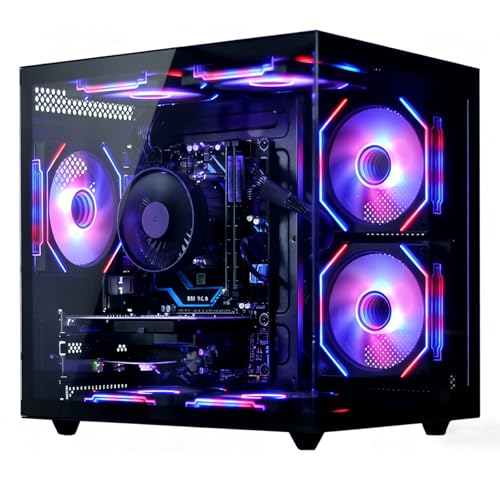
| Cooling | Air cooling with four system cooling fans and an ARGB fan air cooler |
| Operating System | Windows 11 Home |
The Ryzen 7 8700F and RTX 5070 are the heart of the build, and that pairing is what makes the desktop feel like a serious gaming route rather than a general-purpose tower.
In practical use, that means the machine is built for modern titles, streaming, and background tasks without immediately running into the kinds of bottlenecks that make a prebuilt feel dated. The trade-off is price, so the value case is strongest for buyers who will actually use the GPU class rather than just browse and stream video.
The 32GB of DDR5 and 2TB NVMe SSD give the system a comfortable starting point for a gaming library, launchers, and everyday multitasking.
That matters because it keeps the desktop from feeling tight after the first few installs, and it supports the “buy once, use it hard” appeal that many prebuilt shoppers want. The one thing to keep in mind is that the value here comes from the whole package, not from a bargain-bin parts mix.
MSI pairs the tower with four system fans and an ARGB fan air cooler, and that lines up with the quiet, cool behavior buyers keep noticing.
For a gaming PC, that is more than a cosmetic detail. It helps the machine stay civilized during longer sessions, which is exactly what matters when the desktop sits near your ears for hours. The RGB lighting adds flair, but the real buyer benefit is thermal comfort and less noise fatigue.
For a buyer setting this up beside a 4K monitor, the first thing that matters is whether the whole tower feels coherent, and this one does. The RTX 5070 gives the system enough graphics room for modern games, while the 32GB memory and 2TB SSD keep the desktop from feeling cramped when games, launchers, and background apps all live on the same machine. That balance is the real appeal here: it reads like a gaming PC that is ready for long sessions, not one that forces you to start budgeting for storage or RAM on day one.
At the desk, the practical win is how little friction the setup appears to create. Buyers mention easy setup, plenty of ports, and a small enough tower to fit more comfortably than some cheaper, bulkier cases, which matters when the machine is going straight into a home office or gaming corner. The included keyboard and mouse also reduce the first-hour hassle. The flip side is that this is still a full tower with a dedicated GPU, so it rewards a proper desk space and monitor setup more than a cramped, temporary placement.
Under load, the most useful signal is not raw hype but the repeated theme of cool, quiet operation. That matters because gaming desktops can sound great on paper and still feel annoying in a shared room; here, the airflow layout and fan count support the idea of sustained play without the case turning into a distraction. A buyer who wants a machine for late-night gaming, streaming, or multitasking gets the benefit, while someone who wants the absolute cheapest route into Windows gaming will pay for cooling headroom they may never fully use.
Community
The pattern is straightforward: people who get a clean setup, strong game performance, and a quiet-running tower tend to be very happy, while the unhappy cases usually center on reliability or post-return-window problems. The practical lesson is that this desktop’s appeal is strongest when you want a fast gaming machine with solid day-one behavior and you value cooling and noise as much as raw specs.
I’ve had this computer for a couple months playing intense FPS games. The picture is great, it runs the games at 160hz as set, and it handles every higher setting I can set.
I’ve been really happy with the MSI Codex Z2 overall. It feels solid and well-built, stays cool during gaming, and handles multitasking easily.
I’m extremely happy with this purchase. It looks amazing, has a beautiful design, and it’s very quiet, which really surprised me.
Worked well for the first month, then I started getting slow startup and blue screens, and I ended up having to move on from it.
| Attribute | MSI Codex Z2 A8NVP-436US Current | ASUS ROG G700 | Alienware Aurora ACT1250 | Alienware Aurora Gaming Desktop ACT1250 |
|---|---|---|---|---|
| Price | $2,085.51 | $2,199.99 | $1,899.99 | $2,023.24 |
| Graphics | NVIDIA GeForce RTX 5070 | NVIDIA GeForce RTX 5070Ti | NVIDIA GeForce RTX 5070 | - |
| Memory | 32GB DDR5 | 32GB DDR5 | 32 GB DDR5 | 16GB Dual Channel DDR5 (2x 8GB) 5200 MT/s Memory |
| Storage | 2TB m.2 NVMe SSD | 1TB M.2 NVMe PCIe 4 SSD | 1 TB SSD | 1TB NVMe M.2 PCIe Solid State Drive |
| Cooling | Air cooling with four system cooling fans and an ARGB fan air cooler | 240mm liquid cooler with quad-fan airflow system | - | Air-Cooled CPU & Clear Side Panel |
| Editorial score | 85/100 | 95/100 | 88/100 | 84/100 |
Against a mainstream tower like the Dell Tower Plus EBT2250, the MSI makes more sense if gaming is the priority and you want a dedicated RTX 5070 class machine from the start. The Dell’s Intel Ultra 7-265, 64GB memory, and 2TB NVMe storage lean more toward broad productivity headroom, so it is the cleaner choice for someone who values heavier office or creator work over gaming-first tuning.
Compared with a more budget-oriented prebuilt, the Codex Z2’s case is easier to justify when you care about quiet operation, cooling, and a strong graphics card in one package. If you mainly want a cheaper Windows desktop for general use, the extra GPU and cooling overhead here are wasted spend. If you want a tower that is ready for demanding games and a 4K display, this one is the more logical route.
Compare with
Add a second model to activate the direct comparison.



No products match that filter combination.
The MSI Codex Z2 A8NVP-436US is easy to recommend for buyers who want a serious gaming desktop with enough CPU, GPU, memory, and storage to feel complete on arrival. Its best qualities are the balanced hardware, the quiet-cool behavior, and the low-friction setup, which make it a strong fit for someone building a gaming desk around one machine. If you are checking the current offer, this is the kind of prebuilt that makes sense when you want the performance tier more than the project of assembling it yourself. The reservation is durability confidence, because the mixed reliability stories are real enough to matter. If you need the safest long-term buy for a work-first desk or you are shopping on a tighter budget, there are cleaner routes that cost less or lean harder into productivity. For a gaming-focused buyer who accepts the price and wants a ready-to-run tower, this remains the better match.
Gaming first. The RTX 5070, Ryzen 7 8700F, and cooling setup are aimed at sustained play and multitasking, while office use is just a secondary benefit.
Yes. Windows 11 Home is installed, and the included keyboard and mouse make it easier to get the tower on a desk and running quickly.
Review published on