
Ranking medal
Bronze in Best value
This product is top 3 in a published dynamic ranking.
Ranking medal
This product is top 3 in a published dynamic ranking.
If you want a gaming tower that is ready for Windows 11 Home, carries a dedicated RTX 5060 Ti, and still leaves room to grow later, the Legion Tower 5i lands in a useful middle lane. It fits best for a desk-bound gamer or creator who values a clean, expandable setup over a tiny footprint, but the trade-off is that 16 GB of memory and 1 TB of storage are only the starting point for a machine built around heavier play.
I would put this in the buy column for someone who wants a straightforward gaming desktop with modern CPU and GPU hardware, Wi-Fi 6E, Bluetooth, and easy internal access. Skip it if you want a workstation-style tower with more memory headroom out of the box or if your priority is the absolute quietest, most compact desk presence; this is a performance-first tower that asks for desk space in return for upgrade room.
| Processor | Intel Core Ultra 7 265F |
|---|---|
| Graphics | NVIDIA GeForce RTX 5060 Ti |
| RAM | 16 GB DDR5 5600MHz, expandable to 128 GB |
| Storage | 1 TB |
| Form factor | Computer Tower |
| Operating System | Windows 11 Home |
The Core Ultra 7 265F and RTX 5060 Ti make this a coherent gaming tower rather than a random parts mix. That matters because the system is built for the kind of load where CPU and GPU both need to pull their weight, not just one headline component carrying the rest.
For a buyer, that balance is the main reason to choose it over a cheaper general-purpose desktop. It gives you a credible route for modern games, streaming, and creator work without immediately feeling underbuilt.
The tool-less side panel and support for up to 128 GB of DDR5 memory turn this into a machine you can extend instead of replacing quickly. That is a practical advantage for anyone who likes to buy once and add RAM or other components later.
The caveat is simple: you are paying for a tower that expects future changes. If you never plan to upgrade, some of that value sits unused, but if you do, the case design makes the process easier than on many closed desktops.
Wi-Fi 6E, 2.5G Ethernet, and Bluetooth 5.2 cover the basic connection points a gaming desk needs. That matters because it reduces setup friction whether you plug in by cable, connect wirelessly, or pair a headset and controller.
In day-to-day use, this is the kind of connectivity mix that keeps the tower flexible. It is especially helpful if the PC has to move between wired gaming, wireless accessories, and a cleaner cable layout on the desk.
The 180W optimized air-cooling design is a useful signal for sustained play and longer sessions. It tells you this tower is meant to stay composed under load instead of acting like a short-burst desktop.
That does not make it a silent office machine, but it does make it a better match for gaming rooms and shared spaces where stable performance matters more than a minimalist footprint.
On a gaming desk, the Legion Tower 5i makes sense as soon as you pair it with a monitor and peripherals. The RTX 5060 Ti and Core Ultra 7 265F give it the kind of hardware balance that suits modern games, streaming, and a second-life use like a golf simulator or emulator box, while the 1 TB SSD keeps the first round of installs manageable. The real buying question is whether 16 GB of memory is enough for your habits; for lighter play and everyday multitasking it sits comfortably, but heavier game libraries and creative work will push you toward the upgrade path sooner than later.
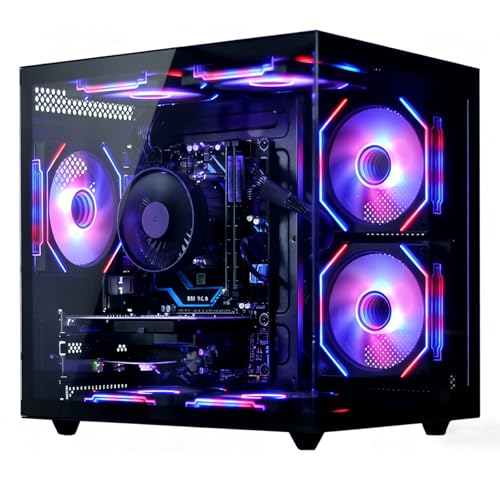
For a living-room or shared-room setup, the transparent side panel and RGB lighting make this tower feel more like a showpiece than a plain black box, and the tool-less access matters because desktop buyers often do not want to fight the case just to add parts later. That upgrade-friendly design is a real value point, especially with memory support up to 128 GB, but it also means the machine is best judged as a platform rather than a finished endpoint. If you want a tower you can keep extending, that is a strength; if you want a sealed-and-forget system, you are paying for headroom you may never use.
Daily use looks practical rather than fussy. Windows 11 Home, 2.5G Ethernet, Wi-Fi 6E, and Bluetooth 5.2 cover the normal desk-startup routine without much friction, and the included power cable, quick setup guide, and warranty paperwork keep the first hour simple. The cooling system is pitched for up to 180W optimized air cooling, which is the right kind of signal for sustained gaming sessions, but this is still a performance tower with a visible desk footprint, so the fit is strongest where airflow and room for a full-size chassis matter more than silence or minimalism.
Community
The pattern is straightforward: buyers are happiest when the tower arrives as a clearly specified, fast machine that feels ready for real use, and the complaints cluster around condition on arrival or the need for stronger graphics settings in demanding games. The practical lesson is that this is best treated as a solid gaming platform with upgrade room, not as a maxed-out build that removes every future decision.
Bought this for a golf simulator and it runs perfectly with no lag or freezing.
Great computer and worth the money, and my package arrived late but the computer came with no damage.
It is quite fast and can run almost any game, but I would want a stronger graphics card for higher fidelity in modern games.
| Attribute | Lenovo Legion Tower 5i Current | Alienware Aurora Gaming Desktop ACT1250 | Alienware Aurora ACT1250 | MSI Codex Z2 A8NVP-436US |
|---|---|---|---|---|
| Price | $1,859.00 | $1,699.99 | $1,999.99 | $2,088.08 |
| Processor | Intel Core Ultra 7 265F | Intel Core Ultra 7 265F | Intel Core Ultra 7 265F | - |
| Graphics | NVIDIA GeForce RTX 5060 Ti | - | NVIDIA GeForce RTX 5070 | NVIDIA GeForce RTX 5070 |
| Memory | 16 GB DDR5 5600MHz, expandable to 128 GB | 16GB Dual Channel DDR5 (2x 8GB) 5200 MT/s Memory | 32 GB DDR5 | 32GB DDR5 |
| Storage | 1 TB | 1TB NVMe M.2 PCIe Solid State Drive | 1 TB SSD | 2TB m.2 NVMe SSD |
| Form factor | Computer Tower | - | Computer Tower | - |
| Operating System | Windows 11 Home | - | - | Windows 11 Home |
| Editorial score | 88/100 | 84/100 | 88/100 | 85/100 |
Against an Alienware Aurora Gaming Desktop with the same Core Ultra 7 265F and 1 TB class storage, the Legion Tower 5i competes on the same basic performance lane but leans harder into easy internal access and a straightforward upgrade story. Choose the Lenovo if you want a gaming tower that feels easier to open and extend; choose the Alienware route if you prefer that brand’s broader premium desktop positioning and do not care as much about the tool-less angle.
Compared with an HP 27-inch All-in-One Desktop, this Lenovo is the better pick when dedicated gaming performance matters more than a tidy all-in-one footprint. The HP route makes more sense for a simpler family or office setup, while the Legion Tower 5i is the stronger choice for someone who wants a real GPU, room to upgrade, and a machine that can handle heavier game sessions without pretending to be a general-use all-in-one.
Compare with
Add a second model to activate the direct comparison.



No products match that filter combination.
The Legion Tower 5i is easiest to recommend to a buyer who wants a real gaming desktop with modern Intel and NVIDIA hardware, simple desk connectivity, and a case that does not box them in later. Its value is strongest when you care about the whole tower, not just the headline GPU, because the upgrade-friendly chassis and clear component mix make it a sensible long-term base. Check the current offer if you are comparing it against similarly priced towers, because the included Game Pass and the easy-upgrade design add more value when the price stays in the right lane.
The main reason to skip it is equally clear: if you want more memory out of the box, more graphics headroom for higher settings, or a smaller and quieter desk footprint, this is not the cleanest fit. It is a performance-first tower with 16 GB of RAM and a full-size presence, so the best buyer is someone who accepts those limits in exchange for a machine that is ready now and expandable later.
Yes. The Core Ultra 7 265F, RTX 5060 Ti, and 16 GB DDR5 base make it a credible gaming tower with enough headroom for streaming and creator work.
Yes. Windows 11 Home, the included power cable and quick setup guide, plus Wi-Fi 6E, Bluetooth 5.2, and Ethernet give it a low-friction start.
Review published on