

Quick verdict
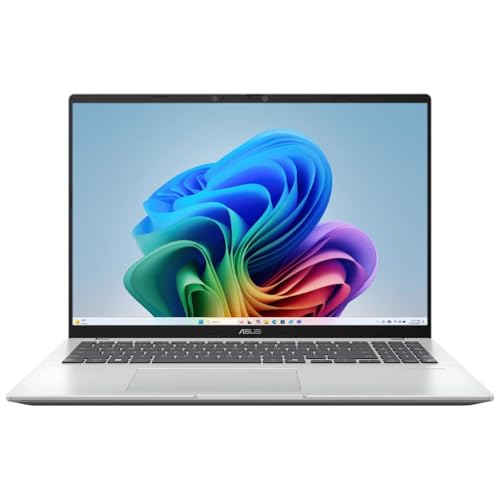
The ASUS Vivobook Go 15.6 fits best for someone who wants a roomy 15.6-inch Windows laptop for everyday work, class, browsing, and streaming without moving into heavier creator or gaming territory. Its appeal is the familiar mix of an Intel Core i3-N305, 8GB of RAM, and a 1080p screen, which is enough for normal day-to-day use. The clearest trade-off is storage and route clarity, because the base 128GB drive is modest and the bundle positioning is unusually busy for a simple office-and-study machine.
I’d put this in the “practical home and school laptop” lane rather than the “buy it for headroom” lane. Choose it if you want a full-size keyboard with a numpad, a 15.6-inch FHD display, and basic modern ports in a lightweight chassis; skip it if your work depends on a clearly stronger platform, bigger local storage, or a more clearly defined premium build. The value case is decent, but the buying decision lives or dies on whether its everyday comfort matters more than its modest storage ceiling.
| Screen size | 15.6 Inches |
|---|---|
| Resolution | 1920 x 1080 pixels |
| RAM | 8 GB |
| Storage | 128 GB |
| Weight | 3.59 lbs |
| Wireless connectivity | Wi-Fi |
| Ports | USB-C; HDMI |
| Webcam | Webcam/camera |
| Input features | fingerprint reader |
Everyday Core
The Core i3-N305, 8GB of DDR4 RAM, and Intel UHD Graphics define this as a straightforward daily-use laptop rather than a performance machine.
That matters because it keeps the focus on browsing, documents, video calls, and light multitasking instead of trying to sell power it does not clearly have.
Screen Comfort
The 15.6-inch Full HD IPS-level display with anti-glare finish, Low Blue Light, and a 60Hz NanoEdge layout is built for long reading and viewing sessions.
In practice, that combination is more about reducing fatigue and keeping text readable than dazzling with brightness or color depth.
Desk-Friendly Inputs
The ErgoSense chiclet keyboard with number key, precision touchpad, and 180° hinge makes the laptop easier to place in a normal desk routine.
The upside is faster typing and easier number work; the trade-off is that the design is practical first, not luxurious.
Ports and Bundle
The confirmed port mix includes USB-C, USB-A, USB 2.0, HDMI, and a combo audio jack, and the bundle adds a USB fingerprint reader plus a 512GB portable SSD hub.
That is useful for a buyer who wants fewer adapters and some immediate storage relief, though the base 128GB internal drive still sets the ceiling for what lives on the machine itself.
Performance and experience
Open it on a kitchen table or small desk and the first thing that matters is the size-to-resolution balance. A 15.6-inch 1080p panel gives enough room for side-by-side documents, browser tabs, and video calls without feeling cramped, and the 3.59 lb weight keeps it in the carryable range for room-to-room use. That mix makes it feel like a real daily laptop, not just a screen attached to a keyboard, but the 128GB internal storage means the comfort story is better than the file-hoarding story.
For writing, classes, and office work, the keyboard layout matters as much as the processor here. The confirmed numpad is a real plus for spreadsheets, data entry, and anyone who lives in numbers, while the 8GB memory keeps basic multitasking in the normal everyday lane. The trade-off is that this is not the kind of machine that invites heavy creative projects or a lot of local media storage; the included portable SSD bundle helps, but it also underlines that the base drive is not generous.
On calls and media, the practical ceiling is straightforward. The 720p webcam with privacy shutter, built-in speakers, array microphone, Wi-Fi 5, and Bluetooth 5.1 make it credible for meetings, streaming, and casual home use, and the 180° hinge adds a little flexibility on a desk. What keeps it from feeling more polished is that the feature set is functional rather than premium, so the fit is strongest for buyers who want dependable basics and are fine with a modest, no-frills experience.
Pros
- Full-size 15.6-inch FHD screen is comfortable for work and media.
- Numpad, USB-C, HDMI, and USB-A give it useful everyday flexibility.
- 3.59 lb weight keeps it reasonably portable for a 15.6-inch laptop.
- Bundle adds a portable SSD and fingerprint reader, which improves day-one usefulness.
Cons
- 128GB internal storage is tight if you keep many apps or files locally.
- The Core i3-N305 and 8GB RAM are fine for basics but not a strong fit for heavier workloads.
- The overall setup is practical rather than premium, so buyers expecting a higher-end feel should look elsewhere.
Comparison
| Attribute | ASUS Vivobook Go 15.6 Current | ASUS Vivobook 16 X1607QA CoPilot+ | ASUS Vivobook 14 E410KA | ASUS Vivobook Go 15 |
|---|---|---|---|---|
| Price | Out of stock | $529.99 | $209.00 | $373.48 |
| Screen size | 15.6 Inches | 16 inches | 14.0-inch | 15.6 Inches |
| Resolution | 1920 x 1080 pixels | 1920 x 1200 pixels | FHD (1920 x 1080) | 1920 x 1080 pixels |
| RAM | 8 GB | 16GB LPDDR5X RAM | 4GB DDR4 RAM | 8 GB |
| Storage | 128 GB | 1000 GB | 128GB eMMC | 256 GB |
| Ports | USB-C; HDMI | - | 1 x USB-A 2.0, 1 x USB-A 3.2, 1 x USB-C 3.2, 1x HDMI, 1x MicroSD card reader | - |
| Editorial score | 68/100 | 70/100 | 59/100 | 70/100 |
Compared with a more basic budget Chromebook route, this ASUS makes more sense if you want Windows 11 Home, a larger 15.6-inch FHD display, and a real numpad for office-style work. The Chromebook-style alternative still wins when simplicity and ultra-light app use are the whole point, but this Vivobook is the better pick if you want a familiar Windows desktop workflow and more flexible ports.
Against a stronger mainstream 15.6-inch laptop with more storage or a faster processor, the Vivobook Go is the easier recommendation only when the use case stays modest. If you expect lots of local files, heavier multitasking, or longer ownership without leaning on external storage, the more capable route is the safer buy; if you mainly want a clean everyday machine with a useful screen and keyboard, this ASUS keeps the decision focused and sensible.
Compare with Compare this model This product stays fixed; add a recommended alternative or search another model in the category.
Compare with
Add a second model to activate the direct comparison.
Recommended models




No products match that filter combination.
Is the ASUS Vivobook Go 15.6 laptop worth it?
The ASUS Vivobook Go 15.6 is easiest to recommend as a practical everyday Windows laptop for study, home, and office use. The 15.6-inch 1080p display, numpad, 3.59 lb weight, and useful port mix give it a real everyday rhythm, and the bundle helps soften the modest base storage. If the current offer is sensible, this is a clean buy for someone who values comfort and convenience more than raw headroom.
Skip it if your work depends on lots of local storage, stronger performance, or a more premium-feeling machine. The 128GB internal drive is the main limiter, and the Core i3-N305 plus 8GB RAM keep it in the basics-first lane, so buyers who need more room to grow should move up a tier. For everyone else, it is a straightforward, usable laptop with a sensible feature set.
FAQ
Is the ASUS Vivobook Go 15.6 good for everyday school and office tasks?
Yes. It fits browsing, documents, video calls, and light multitasking well, with a 15.6-inch Full HD screen and a full-size keyboard that includes a numpad.
How limiting is the 128GB storage on the ASUS Vivobook Go 15.6?
It is the main trade-off. The 128GB internal drive is tight if you keep many apps or files locally, so it works better for lighter storage needs.
Review published on