Review Laptops HP

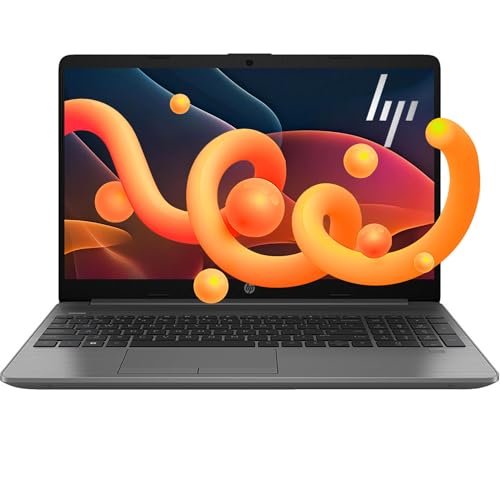
HP ProBook 460 G11 Laptop - Review and opinions

HP ProBook 460 G11
81 /100 Overall

Quick recommendation

Value for money 76/100
Ease of use 78/100
Durability 68/100
Customer reviews 100/100

Is it worth it?

The HP ProBook 460 G11 is aimed at buyers who want a business laptop that can handle a full workday of browser tabs, documents, calls, and storage without feeling stripped down. The Ryzen 7 7735U, 16GB of DDR5 memory, and 512GB NVMe SSD give it the kind of baseline that keeps everyday office work moving, while the 16-inch 1920 x 1200 display gives you more vertical room than a standard 1080p panel. The main trade-off is that this is a practical office machine first, not a lightweight travel companion or a clearly defined creator rig.

Buy it if you want a roomy Windows 11 Pro laptop with Ethernet, a backlit keyboard, and the kind of ports that make desk use easier. Skip it if your priority is the clearest possible platform identity or the lightest carry, because the product family naming and configuration cues are not as tidy as the rest of the hardware story. For work and study at a desk, the balance is appealing; for a buyer who wants zero ambiguity, there are cleaner alternatives.

Screen size 16 inches
Resolution 1920 x 1200 pixels
Processor AMD Ryzen 7 7735U
RAM 16 GB DDR5
Storage 512 GB NVMe SSD
Operating system Windows 11 Pro

Key features

Roomy Workscreen

The 16-inch display uses a 1920 x 1200 resolution, so it gives you more vertical space than a typical 1920 x 1080 laptop. That matters for reading, editing, and side-by-side windows because less scrolling usually means less fatigue over a long session.

The caveat is that this is a productivity-first screen, not a flashy entertainment panel. It is the right fit when clarity and usable workspace matter more than chasing a premium media look.

Desk-Friendly Input and Login

The backlit keyboard, spill-resistant design, and fingerprint reader make the daily routine feel business-oriented rather than generic. Those details matter because they reduce small annoyances when you are typing in dim light or signing in repeatedly during the day.

The practical upside is lower friction for office work and classes. The trade-off is that the laptop’s larger chassis is part of the deal, so the comfort comes with a bigger footprint on the desk and in transit.

Connected for Real Office Use

Wi-Fi 6E, RJ-45 Ethernet, Bluetooth 5.3, USB-A, USB-C, USB4 Thunderbolt, HDMI 2.1, and a 3.5 mm jack give this machine a broad connection set. That is a real buyer advantage if you use external displays, wired networks, or older accessories.

It also keeps the machine flexible as a primary work laptop. Instead of depending on adapters for basic tasks, you can plug into a monitor, a network, or a meeting setup with less friction.

User experience

At a desk with email, spreadsheets, and a dozen browser tabs open, the ProBook’s 16GB memory and NVMe storage are the parts that keep the day from feeling bogged down. The 16-inch 1920 x 1200 panel also matters here because the taller 16:10 shape gives documents and web pages more breathing room than a basic FHD screen. That makes it easier to settle into long office sessions, and it is the kind of comfort that matters more than flashy specs when the laptop is your daily work surface.

For typing, the backlit keyboard and fingerprint reader make the first hour of use feel like a business machine that was built to get out of the way. A spill-resistant keyboard is a useful practical touch for a shared desk or a busy home office, and the confirmed webcam keeps it in the normal range for video calls and remote meetings. The trade-off is simple enough to matter: this is a 16-inch laptop, so the wider footprint buys comfort at the desk but gives up some carry convenience in a backpack.

The connectivity mix is one of the strongest reasons to choose this route. Wi-Fi 6E, RJ-45 Ethernet, Bluetooth 5.3, USB-A, USB-C, USB4 Thunderbolt, HDMI 2.1, and a 3.5 mm jack cover the common office setups without forcing a dongle habit, and that reduces friction when moving between a docked desk and a meeting room. The practical result is a laptop that fits a wired office, a hybrid home setup, or a classroom desk better than a minimalist ultraportable, even if the exact platform identity is not as clean as the hardware list around it.

Pros

  • 16-inch 1920 x 1200 display gives extra vertical workspace for documents and multitasking.
  • Ryzen 7 7735U, 16GB DDR5, and 512GB NVMe create a comfortable everyday performance base.
  • Ethernet, USB4 Thunderbolt, HDMI 2.1, and Wi-Fi 6E reduce adapter dependence.

Cons

  • The 16-inch chassis is less convenient to carry than a smaller office laptop.
  • The product identity is not as cleanly presented as the hardware set around it.
  • It is not the right pick if you want a clearly portable or creator-led machine.

Comparison

Attribute HP ProBook 460 G11 Current HP TPN-Q222 Lenovo V15 G2 ALC HP 255 G10
Price 899.95 USD 619 USD 599 USD 599.99 USD
Screen size 16 inches 15.6 Inches 15.6 Inches 15.6 inches
Resolution 1920 x 1200 pixels 1366 x 768 1920 x 1080 pixels 1920 x 1080 pixels
Processor AMD Ryzen 7 7735U Intel Core i3-1115G4 Processor - -
RAM 16 GB DDR5 32 GB 16 GB 16 GB
Storage 512 GB NVMe SSD 1 TB PCIe NVMe M.2 SSD 512 GB 1 TB SSD
Editorial score 81/100 73/100 77/100 75/100

Against the HP 255 G10, this ProBook is the more convincing desk-first choice because it brings a taller 16-inch 1920 x 1200 screen, Windows 11 Pro, and a broader business-minded connection set. The HP 255 G10 is the easier pick if you want a simpler mainstream laptop route and do not care as much about the extra workspace or wired-office convenience.

Compared with the msi Thin Gaming Laptop 15.6, the ProBook trades gaming posture for office practicality. The msi route makes more sense if you want a performance-first machine with a dedicated gaming angle, while the HP is the better fit for meetings, documents, and networked desk use. The ProBook’s advantage is calmer everyday utility; its limitation is that it does not try to be a gaming machine at all.

Conclusion and verdict

The HP ProBook 460 G11 makes the most sense for a buyer who wants a dependable business laptop with a roomy screen, real wired connectivity, and enough memory and storage for daily work without friction. If you are comparing current offers, this is the kind of machine that earns its place through practical comfort rather than headline-grabbing specs, and that is a good thing for office use. If you want the lightest carry, a cleaner product identity, or a machine with a stronger creator or gaming angle, this is not the easiest route. The bigger chassis and the mixed naming are the main reservations, but for desk-centered work the hardware balance is still the more persuasive story.

Still, compare HP ProBook 460 G11 with close alternatives if warranty, noise, real battery life, or included accessories are decisive for you.

FAQ

Is this a good laptop for office and remote work?

Yes, the Ryzen 7 7735U, 16GB RAM, Windows 11 Pro, webcam, backlit keyboard, and Ethernet make it a strong fit for everyday business use.

Does it need dongles for common desk setups?

No, the mix of USB-A, USB-C, USB4 Thunderbolt, HDMI 2.1, RJ-45, and Bluetooth 5.3 covers most normal connections.

Jake Miller

About the author

Jake Miller

As a passionate tech enthusiast, I review the latest PCs, laptops, and hardware components. With detailed tests and honest insights, I aim to help users build or buy the perfect setup for their needs.