
Battery life
14 h
Battery life
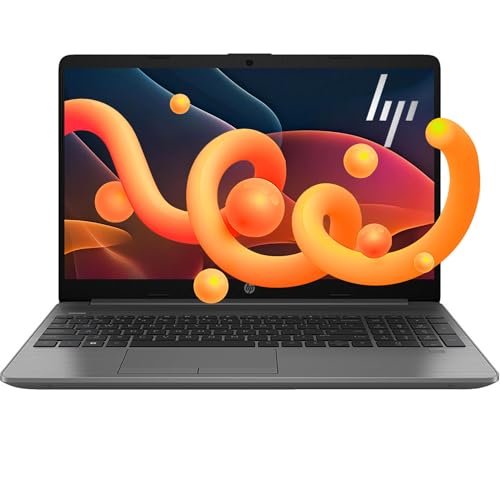
The HP OmniBook 3 16-by0199nr raises a practical question for shoppers who want a large Windows touchscreen without moving into a higher performance tier. Its 16-inch 1920 x 1200 IPS display, Ryzen 3 7320U processor, and full set of USB and HDMI connections make it relevant for browsing, schoolwork, spreadsheets, streaming, and video calls. The trade-off is clear: 8 GB of onboard RAM and a 256 GB SSD keep the configuration focused on everyday use, while Windows and personal files leave less storage headroom for large software libraries or demanding creative work.
This is a sensible fit for a home, study, or office buyer who values screen space, touch input, simple setup, and Windows compatibility more than gaming or workstation performance. I would skip it for sustained editing, serious gaming, or anyone who needs abundant local storage from day one. The claimed battery life of up to 14 hours and 15 minutes and fast USB-C charging improve its mobile appeal, but mixed battery experiences make this a better flexible home-and-office laptop than a guaranteed all-day travel machine.
| Screen size | 16 inches |
|---|---|
| Resolution | 1920 x 1200 |
| RAM | 8 GB LPDDR5-5500 MT/s |
| Storage | 256 GB PCIe NVMe M.2 SSD |
| Panel type | IPS |
The 16-inch 16:10 IPS touchscreen gives browsing, documents, and streaming more room than a typical 15.6-inch 16:9 panel.
Touch is a genuine convenience for scrolling and selecting, while the 300-nit brightness and anti-glare finish keep the design focused on ordinary indoor use rather than color-critical production.
The Ryzen 3 7320U, 8 GB LPDDR5 memory, and NVMe SSD are a coherent combination for web work, school software, office documents, streaming, and light photo tasks.
The 256 GB capacity is the pressure point because Windows and installed applications consume part of it, so buyers with large games or media libraries will need external storage or a different configuration.
The FHD HDR camera, voice-focused noise reduction, Wi-Fi 6, Bluetooth 5.4, HDMI 2.1, and four USB ports cover the core needs of a home or study desk.
The practical gain is fewer dongles for accessories and external displays, while the trade-off is that the machine remains an everyday productivity system rather than a specialized creator or gaming platform.
For a normal morning of browser tabs, documents, email, and a spreadsheet, the OmniBook 3 has the right shape for a comfortable desk routine. The 16:10 1920 x 1200 panel provides 2,304,000 pixels across a large workspace, giving documents and web pages more vertical room than a standard 16:9 Full HD screen. Touch input adds a useful second way to navigate, especially for scrolling and quick selections. The limitation arrives when the workday expands beyond ordinary productivity, because 8 GB of onboard memory leaves less room for heavy multitasking than a 16 GB alternative.
When the laptop moves from desk work to streaming or a video call, the display and communication hardware make a credible home setup. The IPS panel is touch-enabled, anti-glare, rated at 300 nits, and covers 62.5% sRGB, while the FHD camera includes HDR auto-switching and the microphones offer advanced noise reduction with a mode focused on the speaker's voice. That combination addresses backlighting and distracting household noise more directly than a basic camera alone. It is well suited to classes, family calls, and routine meetings, though the color coverage is not aimed at demanding photo or video finishing.
A setup session is also straightforward because the connectivity is unusually useful for an everyday laptop. There are two USB Type-A ports, two USB Type-C ports, HDMI 2.1, and a headphone/microphone combo jack, along with Wi-Fi 6 and Bluetooth 5.4. That gives a desk setup room for common accessories and an external display without making adapters the center of the routine. The 45 W USB-C GaN adapter and stated 0-to-50% charging time of approximately 45 minutes help when the battery needs a quick boost, but the 16-inch format still favors a desk or room-to-room move over effortless daily carry.
Community
The overall opinion is strongly positive about setup, touch response, everyday speed, and value, with the 16-inch display doing much of the convincing. The recurring caution is battery consistency, and one owner also found the build more plastic-like than premium. The practical lesson is to buy this for accessible daily computing, not for maximum performance or luxury construction.
I use it for budget spreadsheets, internet searches, bookings, and online orders. It was easy to begin using, and the touchscreen is a welcome bonus.
It is fast, easy to set up, charges quickly, and holds a charge well even while streaming movies.
The processor works well for talk-to-text, and the touchscreen is responsive and saves time.
| Attribute | HP OmniBook 3 16-by0199nr Current | HP 15-fc0399nr | HP Stream 14 | HP 2025 Premium 14 |
|---|---|---|---|---|
| Price | $649.99 | $499.98 | Out of stock | Out of stock |
| Screen size | 16 inches | 15.6 inches | 14 Inches | 14 inches |
| Resolution | 1920 x 1200 | 1366 x 768 pixels | 1366 x 768 pixels | 1366 x 768 |
| RAM | 8 GB LPDDR5-5500 MT/s | 8 GB LPDDR5-5500 MT/s, onboard | 8 GB DDR4 | 16 GB DDR4 |
| Storage | 256 GB PCIe NVMe M.2 SSD | 256 GB PCIe NVMe M.2 SSD | 128 GB UFS | 628 GB total (128 GB UFS + 500 GB external drive) |
| Editorial score | 80/100 | 76/100 | 69/100 | 71/100 |
Compared with the Acer Aspire Go 15 AI Ready, this HP trades the Acer's Ryzen 7 7730U and 16 GB of RAM for a larger 16-inch touch display and a 1920 x 1200 workspace. Choose the Acer when heavier multitasking and more processor headroom matter most. Choose the HP when touch interaction, screen size, and a Windows home-office routine matter more than sustained performance.
The Lenovo V15 G2 ALC offers 16 GB of RAM and 512 GB of storage with a 15.6-inch 1920 x 1080 screen, making it the more practical route for larger local files and multitasking. The HP answers with a higher 1920 x 1200 resolution, touch input, a confirmed camera and noise-reduction feature set, and a more extensive stated port arrangement. Buyers focused on storage capacity should choose the Lenovo, while buyers who will actively use touch and value extra vertical screen space have the stronger reason to choose the OmniBook 3.
Compare with
Add a second model to activate the direct comparison.





No products match that filter combination.
The HP OmniBook 3 16-by0199nr is a strong everyday Windows choice when the priority is a roomy touchscreen, simple setup, useful ports, and comfortable browsing or office work. Its 16:10 display, FHD HDR camera, fast SSD, and quick USB-C charging give the basic configuration more day-to-day polish than its Ryzen 3 label suggests. Check the current offer if those priorities match your routine. The buying rule is less favorable for demanding users. If you need 16 GB or more of memory, substantial local storage, sustained creative performance, or dependable long unplugged sessions, the 8 GB and 256 GB configuration creates too much compromise. For that route, the Acer Aspire Go 15 AI Ready or Lenovo V15 G2 ALC is the clearer choice.
It is better suited to browsing, streaming, schoolwork, office applications, and light photo tasks. The Ryzen 3 7320U, 8 GB RAM, and Radeon 610M graphics do not define a high-performance gaming or workstation route.
Yes. It includes two USB Type-A ports, two USB Type-C ports, HDMI 2.1, a headphone/microphone combo jack, Wi-Fi 6, and Bluetooth 5.4, so common accessories and an external display can be connected without relying on a large adapter hub.
Review published on