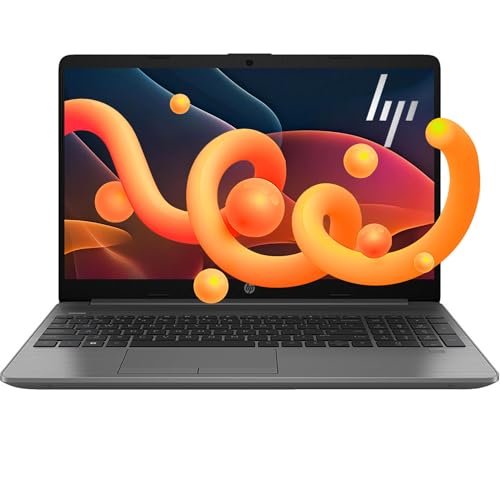
Review Laptops HP

HP TPN-Q222 Laptop - Review and opinions

HP TPN-Q222
73 /100 Overall

Quick recommendation

Value for money 78/100
Ease of use 72/100
Durability 62/100
Customer reviews 82/100

Is it worth it?

This HP 15.6-inch touchscreen laptop makes the most sense for students, home users, and office buyers who want a roomy screen, a fast-feeling everyday setup, and a lot of memory for browser tabs, documents, and light multitasking. The big draw is the combination of 32GB RAM and a 1TB SSD, which gives this Core i3 model a much more comfortable daily rhythm than the processor name alone would suggest. The clearest trade-off is the display: it is touch-enabled and large, but still HD at 1366 x 768, so sharpness is not the headline here.

I would put this in the “good for practical daily work, not for display snobs” lane. Buy it if you want a straightforward Windows 11 laptop for school, email, spreadsheets, streaming, and general home use with plenty of storage headroom; skip it if screen clarity is a top priority or if you need a machine with stronger long-term confidence than the mixed reliability picture allows. The value comes from the memory-and-storage package, while the compromise is that the panel and durability story are more modest than the spec list sounds.

Screen Size 15.6 Inches
Resolution 1366 x 768
Processor Intel Core i3-1115G4 Processor
RAM 32 GB
Storage 1 TB PCIe NVMe M.2 SSD
Wireless Wi-Fi and Bluetooth

Key features

Memory and storage

The headline strength is the 32GB of DDR4 memory paired with a 1TB PCIe NVMe SSD. That is the part of the configuration that changes daily use the most, because it keeps browser-heavy work, office files, and app switching from feeling boxed in.

For a buyer, this is the reason the machine can serve as a real school or home workstation instead of a bare-minimum notebook. The caveat is that the display and processor still define the ceiling, so the internal headroom helps comfort and responsiveness more than it transforms the laptop into a performance machine.

Touchscreen and 15.6-inch panel

The 15.6-inch touchscreen gives the laptop a simple, familiar way to handle browsing, scrolling, and casual media use. It also makes the machine easier to live with when you are moving between documents, web pages, and quick taps.

That convenience matters because it softens the everyday feel of a basic Windows laptop. The compromise is resolution and panel quality: HD at this size is serviceable, but it is not the kind of screen that makes text or photos look especially refined over long sessions.

Ports and daily flexibility

USB-C, two USB-A ports, HDMI, an AC smart pin connector, a headphone/mic combo jack, Wi-Fi, and Bluetooth make this a practical desk companion. It covers the usual bases for charging, peripherals, external displays, and wired audio.

That is a real buyer advantage if you want fewer adapters and less setup friction. It is also the reason this model fits home and study routines better than a stripped-down ultraportable, even though the battery and reliability concerns keep it from being the best pick for constant mobile use.

User experience

For a workday that starts with email, browser tabs, and a few office apps, this HP has the kind of setup that gets out of the way quickly. The 32GB of RAM is the standout here, because it leaves room for multitasking without the usual pressure of closing windows, and the 1TB SSD gives the machine enough breathing space for files, downloads, and installed apps. That combination is what makes a modest Core i3 route feel practical instead of cramped. The trade-off is that the screen still lands in HD, so the desktop feels spacious but not especially crisp for long reading sessions.

At a desk with a charger, the port mix is genuinely useful for a mainstream laptop: USB-C, two USB-A ports, HDMI, and an SD card reader cover most common accessories without immediately reaching for a hub. That matters for a student bag or a home office because it keeps the first hour of use simple and keeps external display hookup realistic. The touch display adds convenience for quick taps and scrolling, and the responsive feel reported in buyer feedback fits the kind of casual navigation this machine is built for. What you do not get is a premium panel experience, so the 220-nit, 45% NTSC display spec leaves this better suited to indoor work than color-sensitive or glare-heavy use.

The bigger decision point is how much confidence you want in the long run. The 15.6-inch chassis is workable for desk use, but the comments around battery life and reliability keep this from becoming an easy travel-first recommendation. For room-to-room use, the 32GB/1TB setup is appealing because it reduces storage anxiety and keeps everyday performance smooth, yet the mixed durability signal means this is best for buyers who value day-one usefulness more than a polished ownership story. If you need a laptop to live on the couch, in class, and away from the outlet for long stretches, there are cleaner fits.

Pros

  • 32GB RAM and a 1TB SSD make everyday multitasking feel spacious.
  • Touchscreen input adds convenience for browsing and casual use.
  • Useful port mix reduces adapter dependence for common desk setups.
  • Windows 11 Home and Wi-Fi/Bluetooth make it easy to slot into a normal home or school routine.

Cons

  • HD resolution at 15.6 inches limits sharpness for long reading or image-heavy work.
  • Battery life gets mixed feedback and does not support a strong unplugged-use case.
  • Reliability is uneven enough that long-term ownership confidence is not the main selling point.
  • The chassis and display are more practical than premium, so it is not the best fit for buyers chasing a refined feel.

Community

User reviews

The pattern is easy to read: buyers are happiest when they focus on speed, storage, and simple setup, and they get frustrated when the battery, screen quality, or long-term reliability becomes the main story. The practical lesson is that this laptop rewards everyday productivity and indoor use more than it rewards travel or long ownership confidence.

Richard

After several weeks, the fast boot times, smooth multitasking, and roomy storage have kept everyday work comfortable for me.

Amy

I had to get the Microsoft account and OneDrive setup right during initial setup, but once that was done the machine behaved the way I wanted.

Karen

Mine started acting up after the warranty period and support could not fix it, which left me stuck with a broken laptop.

Steve

It was easy to set up, it handles my general-purpose work well, and the port selection gives me plenty to plug in.

Comparison

Attribute HP TPN-Q222 Current HP 255 G10 HP G8 NIMO N151
Price 619 USD 599.99 USD 449.99 USD 399.99 USD
Screen Size 15.6 Inches 15.6 inches 15.6 inches 15.6 Inches
Resolution 1366 x 768 1920 x 1080 pixels 1920 x 1080 pixels 1920 x 1080 pixels
Processor Intel Core i3-1115G4 Processor - - Intel Pentium Quad Core N100
RAM 32 GB 16 GB 16 GB 16 GB
Storage 1 TB PCIe NVMe M.2 SSD 1 TB SSD 1 TB 1024 GB
Wireless Wi-Fi and Bluetooth WiFi 6 RTL8821CE-M 802.11a/b/g/n/ac (1×1) Wi-Fi and Bluetooth 4.2 wireless card - Wi-Fi 6, Bluetooth 5.2
Editorial score 73/100 75/100 73/100 74/100

Against the HP 255 G10, this model wins on daily comfort if you care more about the touchscreen and the much larger 32GB memory pool than about a sharper 1080p panel. The 255 G10 route is better for buyers who want a cleaner Full HD screen and a more conventional balanced laptop profile, while this HP is the better pick when multitasking headroom and touch convenience matter more than display crispness.

Compared with the msi Thin Gaming Laptop 15.6 FHD 144Hz i5-13420H RTX 3050, this HP is in a completely different lane. The msi is for buyers chasing gaming and performance headroom, a dedicated GPU, and a high-refresh display; this HP is for office work, study, and general home use where the 32GB RAM and 1TB SSD matter more than frame rates. If gaming or creator workloads drive the purchase, the msi route is the better fit; if you want a quieter, simpler mainstream laptop, this HP makes more sense.

Conclusion and verdict

This HP Notebook is easy to recommend for buyers who want a roomy, practical Windows 11 laptop for school, home, and general office work. The 32GB RAM and 1TB SSD are the real value drivers, the touchscreen adds convenience, and the port selection keeps day-to-day setup simple. If the current offer is reasonable, it is a sensible buy for indoor productivity and casual use. Skip it if you want a sharper display, stronger battery confidence, or a laptop that feels clearly built for long-term rough use. The HD panel and mixed reliability signal keep it from being the universal answer, but for buyers who care most about multitasking comfort and storage headroom, it lands in a useful sweet spot.

Still, compare HP TPN-Q222 with close alternatives if warranty, noise, real battery life, or included accessories are decisive for you.

FAQ

Is this a good laptop for school and office work? Yes. The 32GB RAM, 1TB SSD, touchscreen, and practical port selection make it a strong fit for documents, browsing, and multitasking?

Is it a good travel laptop? Not really. The battery feedback is mixed, and the HD display plus mainstream build make it better for desk and room-to-room use than for long days away from power.

What kind of buyer is TPN-Q222 best for?

With Intel Core i3-1115G4 Processor, 32 GB, 1 TB PCIe NVMe M.2 SSD, it looks best suited to office work, web use, streaming, and other everyday tasks based on the listed specs. If you need heavier workloads, compare performance, cooling, and software requirements more closely.

Jake Miller

About the author

Jake Miller

As a passionate tech enthusiast, I review the latest PCs, laptops, and hardware components. With detailed tests and honest insights, I aim to help users build or buy the perfect setup for their needs.