
NIMO N151 Laptop - Review and opinions


Storage
Quick verdict
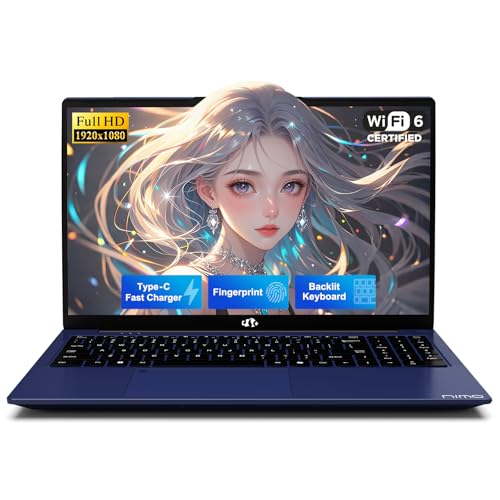
The NIMO N151 fits best for a student, home office, or family laptop buyer who wants a roomy 15.6-inch screen, 16 GB of RAM, and a 1 TB SSD without moving into a pricier performance tier. Its appeal is straightforward: it gives you the everyday comfort of a full-size keyboard, fingerprint login, backlit keys, Wi-Fi 6, and Bluetooth 5.2 in a package that is aimed at common work, school, and streaming tasks. The main trade-off is that this is not the kind of laptop to buy for serious gaming or heavy creative work.
I’d put this in the “buy it for daily usefulness, skip it for demanding workloads” lane. It makes sense for office apps, web work, school, and light multitasking, especially if you value the large screen and generous storage more than raw speed. If you need a machine for sustained gaming, editing, or long unplugged days, the mixed battery and thermal feedback is the reason to look elsewhere.
| Screen size | 15.6 Inches |
|---|---|
| Resolution | 1920 x 1080 pixels |
| Processor | Intel Pentium Quad Core N100 |
| RAM | 16 GB |
| Storage | 1024 GB |
| Wireless connectivity | Wi-Fi 6, Bluetooth 5.2 |
| Keyboard | backlit keyboard |
| Input features | fingerprint reader |
Big Screen, Clear Daily Use
The 15.6-inch 1920 x 1080 display gives you the most useful kind of space for a budget-friendly laptop: enough room for reading, browsing, and side-by-side windows without turning the chassis into a tiny work area.
That matters because this is the kind of screen size that supports school notes, office documents, and streaming in a normal home setup. It is a practical fit for long sessions at a desk, but it is not the kind of panel that changes the laptop’s class into a creator machine.
Storage and Memory Headroom
The 16 GB RAM and 1 TB SSD combination is the strongest practical spec pair here. It gives the laptop room for everyday multitasking and a lot of local files without making storage management part of the routine.
For buyers who keep documents, media, and installed apps on one machine, that is a real convenience. The upside is obvious in normal use; the caution is that storage and memory alone do not turn this into a high-performance laptop for heavy gaming or editing.
Convenience Features That Matter
Backlit keys, fingerprint login, Wi-Fi 6, and Bluetooth 5.2 are the features that make the N151 feel modern in day-to-day use. They reduce small annoyances instead of chasing headline specs.
That combination is especially useful for students and home-office buyers who want quick sign-in, easier typing in dim rooms, and current wireless support. The practical limit is that convenience does not erase the laptop’s basic-performance positioning.
Performance and experience
For a desk setup with browser tabs, documents, and messaging open at once, the N151 lands in the practical zone quickly. The 16 GB of RAM and 1 TB SSD are the kind of combination that keeps startup and file handling comfortable for schoolwork or office routines, while the 15.6-inch 1080p panel gives enough room to split windows without feeling cramped. That balance is the main reason this model makes sense for everyday work rather than as a stripped-down budget stopgap.
Typing and navigation are where the shape of the laptop starts to matter. The confirmed backlit keyboard and numeric keypad make it easier to settle into long writing sessions, spreadsheet entry, or simple bookkeeping, and the fingerprint reader trims a little friction from repeated sign-ins. The trade-off is that this is a full-size 15.6-inch machine, so it rewards a desk more than a lap, and its portability is better described as manageable than featherweight.
The weaker side of the story shows up when the workload gets louder, hotter, or more demanding. Buyers who want light gaming or a bit of creative work will get a basic-capable machine rather than a performance-first one, and the mixed battery reports mean this is not the laptop I’d choose for a long day away from the charger. With a 15.6-inch 1920 x 1080 display, the screen is set up for comfortable viewing, but the real fit depends on whether your day is mostly common apps and media or something that pushes the hardware harder.
Pros
- 16 GB RAM and 1 TB SSD give it real everyday breathing room.
- 15.6-inch 1080p screen is a comfortable size for work and media.
- Backlit keyboard, fingerprint reader, Wi-Fi 6, and Bluetooth 5.2 improve daily convenience.
- Full-size layout with numeric keypad suits school and office tasks.
Cons
- Not a good pick for gaming or heavier creative work.
- Battery life is mixed, so it is not the best choice for long unplugged use.
- Speaker output has been described as weak in everyday use.
- The 15.6-inch chassis is less travel-friendly than a smaller laptop.
Community
User reviews
The recurring pattern is simple: people like this laptop when they want fast-enough everyday use, easy setup, and strong value, and they get disappointed when they push it into gaming or long battery-dependent use. The practical lesson is that the N151 rewards buyers who want a roomy, capable home or work laptop, not one who need a performance or endurance specialist.
Setting up the laptop was pretty easy when it came out of the box.
They are super affordable and comparable to what we've had in the past with much more expensive HP laptops.
The built in speakers are very low sounding, and it is abit slow, Xbox games crashes constantly.
In less than two months, the laptop refused to hold a full charge.
Comparison
| Attribute | NIMO N151 Current | NIMO 15.6 Light Gaming | NIMO N157B | Auusda T156A |
|---|---|---|---|---|
| Price | Out of stock | $999.99 | Out of stock | $419.99 |
| Screen Size | 15.6 Inches | 15.6 inches | - | 15.6 Inches |
| Resolution | 1920 x 1080 pixels | 1920 x 1080 | - | 1920 x 1080 Pixels |
| Processor | Intel Pentium Quad Core N100 | AMD Ryzen 7 PRO 6850U | Intel Processor N150 | Intel Mobile CPU, 4-core, up to 3.4 GHz |
| RAM | 16 GB | 16 GB LPDDR5 | 16 GB RAM | 16 GB DDR4 |
| Storage | 1024 GB | 1 TB SSD | 1 TB SSD | 1 TB NVMe SSD |
| Wireless | Wi-Fi 6, Bluetooth 5.2 | - | Wi-Fi 6 and Bluetooth 5.2 | - |
| Editorial score | 72/100 | 72/100 | 67/100 | 71/100 |
Against a typical Chromebook or very basic school laptop, the N151 offers a much more flexible Windows route, more storage, and a fuller desktop-style layout. That makes it better for families, students, or home-office buyers who want one machine for documents, web work, and local files. The trade-off is that it carries more weight and more complexity than the simplest web-first option.
Compared with a mainstream thin-and-light like an HP Pavilion or Acer Aspire-style everyday laptop, the NIMO’s value case leans on the 1 TB SSD, 16 GB RAM, and convenience features rather than premium build polish. It is the better pick if you want storage and a roomy keyboard at a friendlier price point, while a more established thin-and-light is the safer route if you care more about battery consistency, speakers, and overall refinement.
Compare with Compare this model This product stays fixed; add a recommended alternative or search another model in the category.
Compare with
Add a second model to activate the direct comparison.
Recommended models


No products match that filter combination.
Is the NIMO N151 laptop worth it?
Buy the NIMO N151 if you want a roomy, low-friction Windows laptop for school, home office, or family use and your day is mostly documents, browsing, streaming, and light multitasking. That is where its 16 GB of RAM, 1 TB SSD, full-size layout, and convenience features actually pay off. Skip it if you need a machine for serious gaming, heavier creative work, or long stretches away from a charger, because that is where the N151 stops feeling like a smart value and starts feeling like a compromise.
The trade-off that matters most is battery and overall mobility: the NIMO N151 makes sense when you can work near power and value comfort and storage more than portability, but it is the wrong buy if endurance and refinement are the priority. If your purchase decision comes down to whether you want a capable desk-friendly everyday laptop or a more polished all-day portable, choose this one for the first route and look elsewhere for the second.
FAQ
Is the NIMO N151 a good choice for school or office work?
Yes. It is a practical fit for school notes, office documents, browsing, and everyday multitasking.
Can the NIMO N151 handle gaming or heavier creative work?
It is not a good pick for gaming or heavier creative work.
Review updated on