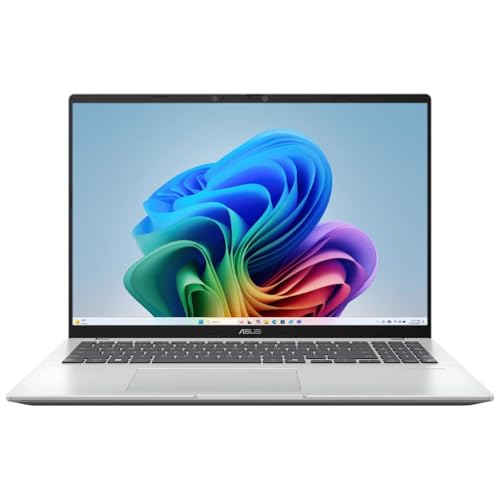
Is it worth it?
If you want a Windows laptop that can handle office work, classes, and heavy browser multitasking without feeling cramped, this Lenovo has a clear lane. The 13th Gen Core i5-13420H, 16GB of DDR5 memory, and 512GB SSD make it relevant for people who live in documents, tabs, video calls, and spreadsheets, while the 16-inch WUXGA screen gives more vertical room than a standard 1080p panel. The trade-off is that it is not the kind of machine you buy for ultra-light travel or all-day unplugged use first.
This is the better fit for a student, remote worker, or small-business buyer who wants a roomy clamshell with a numpad, solid everyday speed, and a practical port mix. Skip it if you need the lightest carry, a clearly premium battery story, or a machine whose identity is centered on gaming or creator workloads. The appeal here is straightforward productivity comfort, but the weight and battery expectations keep it in the mainstream office lane rather than the ultraportable one.
| Screen Size | 16 Inches |
|---|---|
| Resolution | 1920x1200 |
| Processor | Intel Core i5-13420H |
| RAM | 16GB DDR5 |
| Storage | 512GB M.2 PCIe NVMe SSD |
| Weight | 3.70 lbs |
Productivity speed that feels current
The Core i5-13420H, 16GB of DDR5, and 512GB SSD form a balanced everyday setup for office apps, browsers, calls, and light content work. That combination is what keeps the laptop feeling responsive when several tasks are open at once.
The practical question is not whether it can open apps, but whether it stays comfortable when a workday gets messy. In that sense it fits people who want smooth daily use more than headline performance, while buyers chasing gaming or heavier creation should look elsewhere.
A screen built for documents and multitasking
The 16-inch WUXGA IPS panel gives 1920x1200 resolution, anti-glare treatment, and 300-nit brightness, which is a strong mix for reading, editing, and split-window work. The extra vertical space over 1080p is especially useful in spreadsheets and long documents.
That makes the laptop easier to use for study and office work, but it also means the chassis is sized around screen comfort rather than maximum portability. If you spend long hours at a desk, that is a good trade; if you want the smallest possible machine, it is not.
Ports and layout that reduce desk friction
Two USB-A ports, one USB-C port with Power Delivery and DisplayPort support, HDMI, SD card reader, and a 3.5mm jack give this model a straightforward office setup. The full-size keyboard with numpad also matters because it speeds up number entry and makes the machine easier to place in accounting, admin, or spreadsheet-heavy routines.
The practical upside is fewer adapters and less fiddling when you connect a monitor or peripherals. The trade-off is that the laptop is built around usefulness at a desk, not around featherweight travel convenience.
Privacy and call readiness without extra accessories
The HD 720p webcam includes a physical privacy shutter, which is a simple but meaningful touch for people who take calls from home or a shared space. WiFi 6 and Bluetooth 5.2 round out the modern connectivity basics, and the Luna Grey finish with a 3.70 lb weight keeps the overall package grounded in practical office use.
This is the kind of feature set that removes small annoyances rather than creating excitement. It suits buyers who want a dependable work machine with a sensible call setup, but it does not turn the laptop into a mobility-first or premium-feeling standout.
Use evaluation
At a desk with email, a browser, and a spreadsheet open side by side, the 16GB DDR5 memory and H-class i5 give this Lenovo the kind of headroom that keeps everyday work from feeling crowded. The 1920x1200 panel matters here because the extra vertical space makes documents and sheets easier to live with than a basic 1080p layout, and the full-size keyboard with numpad turns data entry into a more natural part of the routine. The result is a machine that fits office work well, with the main compromise being that the larger screen comes with a larger body to carry around.
For video calls and streaming, the built-in 720p webcam with privacy shutter is a practical plus because it covers the normal remote-work basics without adding extra setup friction. WiFi 6 and Bluetooth 5.2 round out the everyday connectivity story, and the port mix is genuinely useful with two USB-A ports, a USB-C port with Power Delivery and DisplayPort support, HDMI, SD card reader, and a 3.5mm jack. That makes it easy to plug into a monitor, move files, and keep a mouse or storage device attached, although the 3.70 lb weight means this is more comfortable as a carry-between-rooms laptop than as a constant travel companion.
The battery story is the main caution. One buyer-facing note in the review trail is that unplugged time has not matched expectations, and that lines up with the way this model is positioned as a productivity laptop rather than a long-haul mobile machine. If your day is mostly desk, charger, and short moves between rooms, that is manageable; if you expect a long stretch away from power, the fit gets weaker fast. The upside is that the performance and screen comfort are doing real work, but the battery trade-off keeps the value tied to how often you sit near an outlet.
Pros
- Fast-feeling everyday performance from the Core i5, DDR5 memory, and SSD.
- Large 16-inch 1920x1200 display that is easier on documents and split-screen work.
- Full-size keyboard with numpad plus a useful port selection for desk use.
- Physical webcam shutter adds a simple privacy benefit for calls.
Cons
- At 3.70 lb, it is not the lightest choice for frequent carry.
- Battery expectations are mixed, and unplugged use is the weakest part of the value story.
- Office setup and data transfer can add friction for less technical buyers.
Community
User reviews
The recurring pattern is simple: people like the speed, the keyboard, and the roomy screen, then start noticing the battery and setup friction once the laptop becomes part of a real routine. The practical lesson is that this model wins when it stays near a desk and loses some appeal when unplugged time or first-time software setup matters more than everyday comfort.
It loads very quickly, the keyboard feels smooth, and the screen is bright and pleasant to look at, but Office setup took patience and the battery did not last as long as I expected.
Great keyboard, great touchpad, strong build, and the battery lasts for hours of casual use, though the weight is a little hefty.
So far so good. Everything works great.
Comparison
| Attribute | Lenovo IdeaPad Slim 3 16" Current | Lenovo V15 G2 ALC | Lenovo IdeaPad Slim 5 | HP 2025 Flagship 15 |
|---|---|---|---|---|
| Price | $664.98 | $659.00 | $769.99 | $649.00 |
| Screen Size | 16 Inches | 15.6 Inches | 16 Inches | 15.6 Inches |
| Resolution | 1920x1200 | 1920 x 1080 pixels | 1920 x 1200 | 1366 x 768 pixels |
| Processor | Intel Core i5-13420H | - | Intel Core i7-1355U 13th Gen Deca-core | - |
| RAM | 16GB DDR5 | 16 GB | 16 GB | 16 GB DDR4-3200 MT/s |
| Storage | 512GB M.2 PCIe NVMe SSD | 512 GB | 1 TB SSD | 1TB Storage (512 GB PCIe NVMe M.2 SSD + 500 GB External Drive) |
| Editorial score | 67/100 | 71/100 | 69/100 | 68/100 |
Against the Lenovo V15 G4 IRU, this IdeaPad Slim 3 offers the same Core i5-13420H and 16GB RAM but a larger 16-inch 1920x1200 display instead of a 15.6-inch 1080p panel. Choose the IdeaPad if screen comfort and spreadsheet room matter more; choose the V15 if you want a simpler size step down without changing the core performance class.
Compared with the HP 2025 Flagship 15, this Lenovo is the more convincing office laptop because the HP’s 1366x768 screen is a much weaker fit for long document work, even if its storage bundle looks larger on paper. If your priority is everyday readability and a more modern panel, this Lenovo is the better route; if you only need a basic low-cost Windows machine, the HP lane stays more bare-bones.
The Apple MacBook Neo sits in a different lane entirely with a smaller 13-inch screen, Apple A18 Pro chip, and 8GB RAM. That route makes sense for buyers who want a compact premium machine and are already comfortable in Apple’s world, while this Lenovo is the more practical choice for Windows-first office work, numeric input, and a fuller desktop-style layout.
Compare with Compare this model This product stays fixed; add a recommended alternative or search another model in the category.
Compare with
Add a second model to activate the direct comparison.
Recommended models
No products match that filter combination.
Is the Lenovo IdeaPad Slim 3 16" laptop worth it?
This Lenovo IdeaPad Slim 3 16" makes the strongest case for buyers who want a roomy Windows work laptop with real everyday speed, a useful port set, and a keyboard that handles numbers without fuss. If you spend most of your time in Office, browser tabs, meetings, and documents, the 16-inch 1920x1200 display and 16GB DDR5 configuration give you a setup that feels practical rather than compromised, and the current offer is worth checking if that is your lane. The clearest reason to skip it is mobility. The 3.70 lb weight and mixed battery expectations keep it from being the best choice for frequent travel or long unplugged sessions, and the setup can take more patience than a simple sign-in-and-go machine. If that trade-off matters, look for a lighter laptop with a stronger battery focus; if not, this one lands in a very workable middle ground for office and study use.