


Storage
Weight
Is it worth it?
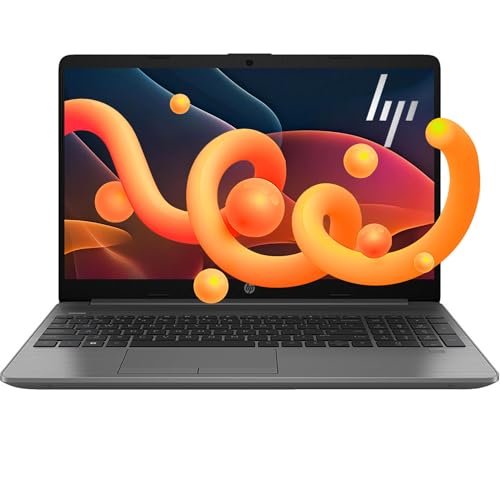
If you want a 15.6-inch Windows laptop that can handle office work, school tasks, and a pile of browser tabs without feeling cramped, this HP lands in a practical middle lane. The 16 GB RAM, SSD-plus-external-storage setup, touchscreen, and included Office bundle make it relevant for buyers who want a ready-to-use Windows machine with extras. The trade-off is just as clear: the 1366 x 768 display is basic for the size, so this is a utility-first buy, not a screen-first one.
I’d put this in front of someone who values easy setup, broad everyday usefulness, and storage headroom more than display sharpness or premium portability. It fits best as a home, school, or small-business laptop where the keyboard, numpad, bundled accessories, and Windows 11 Pro matter more than chasing a higher-resolution panel. If your work lives on a sharper screen or you need a machine that feels polished in every detail, there are cleaner alternatives.
| Screen size | 15.6 Inches |
|---|---|
| Resolution | 1366 x 768 pixels |
| RAM | 16 GB DDR4-3200 MT/s |
| Storage | 1TB Storage (512 GB PCIe NVMe M.2 SSD + 500 GB External Drive) |
| Graphics | Intel UHD Graphics |
Everyday performance
The core setup is a 6-core Intel Core i3-1215U, 16 GB of RAM, and SSD-based storage with an added portable drive. That combination matters because it keeps normal work from stacking up into a sluggish session, especially when you are juggling documents, web apps, and downloads.
The practical upside is less about speed bragging and more about avoiding friction at the start of the day. The limit is that this is still an integrated-graphics Windows laptop, so it belongs in productivity and light creative use rather than heavy gaming or demanding creator work.
Screen and touch use
The 15.6-inch touch display makes the machine easier to steer with taps and swipes when you are moving quickly through apps, forms, or streaming content. It also pairs well with the built-in camera and microphones for classes and video calls.
The catch is the panel resolution. On a screen this size, 1366 x 768 keeps the experience functional but not especially sharp, so text density and image detail are the first places you notice the budget positioning.
Bundle and setup value
The accessory pack adds a 6-in-1 USB-C hub, HDMI cable, USB cable, mouse pad, wireless mouse, and 500 GB portable hard drive, plus lifetime Microsoft Office Professional Plus. That changes the buying decision because it reduces the extra purchases many Windows buyers expect on day one.
The upside is convenience for home, school, or a small office. The caution is that the value leans heavily on wanting those extras; if you already own a dock, mouse, and office software, the bundle matters less than the screen and platform fit.
Use evaluation
At a desk with email, documents, and a few tabs open, the appeal is the same thing that makes this model easy to place in a real routine: 16 GB of memory, SSD storage, and Windows 11 Pro keep the everyday flow from feeling constrained. The 15.6-inch size gives enough room for work without making the chassis feel tiny, and the full-size keyboard with numpad is a real plus for forms, spreadsheets, and schoolwork. The screen itself is the limiting factor, though, because 1366 x 768 on 15.6 inches works out to about 100 pixels per inch, which is fine for basic use but not the crispest canvas for long reading or detailed editing.
For calls, classes, and family use, the included webcam, dual-array microphones, Wi‑Fi 6E, and Bluetooth 5.3 make the machine easy to fold into a normal connected setup. The touchscreen adds a practical second way to move around when you are browsing, signing in, or showing something quickly to someone beside you. That convenience comes with a familiar budget-laptop trade-off: the display is HD rather than sharp Full HD, so the touch layer helps interaction more than it improves image quality.
Battery and portability set the final boundary. HP lists up to 9 hours and the machine weighs 3.52 lb, which keeps it believable for moving between rooms or carrying to class, but it is not the kind of laptop that disappears in a bag. The included dock, mouse, HDMI cable, USB cable, mouse pad, and 500 GB portable drive reduce day-one friction, yet the battery comments in the review mix are enough to keep this from being a carefree unplugged pick. For a buyer who expects a lot of desk time and appreciates bundled extras, that balance works; for someone who lives away from outlets, it is not the strongest route.
Pros
- 16 GB RAM and SSD-based storage keep everyday Windows work comfortable.
- The bundle reduces setup friction with a hub, mouse, cables, and portable storage.
- Touchscreen, numpad, and Windows 11 Pro make it easy to slot into school or office routines.
- Lifetime Office adds real value for buyers who would otherwise spend more after purchase.
Cons
- The 1366 x 768 display is plain for a 15.6-inch laptop.
- Battery life is not the strongest part of the experience.
- The integrated graphics keep it out of serious gaming or creator territory.
- The bundle is less compelling if you already own a dock, mouse, and office software.
Community
User reviews
The recurring pattern is straightforward: people like how quickly this laptop gets into service, how much usable storage it brings, and how complete the bundle feels out of the box. The main disappointment is narrower and more practical than dramatic, with battery life and a few fit details carrying most of the tension. The lesson is that this is strongest when you want a ready-made Windows setup, not when you want the sharpest screen or the most polished mobility.
Great computer. Plenty of storage, especially with the new extra hard drive. Fast processor so you can get several things done at once. Definitely buy this item for my home and business needs.
Comparison
| Attribute | HP 2025 Flagship 15 Current | HP 255 G10 | HP 14 | HP ProBook 460 G11 |
|---|---|---|---|---|
| Price | Out of stock | $699.99 | $349.99 | $999.95 |
| Screen Size | 15.6 Inches | - | 14 inches | 16 inches |
| Resolution | 1366 x 768 pixels | - | 1366 x 768 | 1920 x 1200 pixels |
| Graphics | Intel UHD Graphics | - | Intel UHD Graphics 600 | - |
| RAM | 16 GB DDR4-3200 MT/s | 16 GB RAM | 16 GB | 16 GB DDR5 |
| Storage | 1TB Storage (512 GB PCIe NVMe M.2 SSD + 500 GB External Drive) | 1 TB SSD | 64 GB SSD | 512 GB NVMe SSD |
| Editorial score | 73/100 | 65/100 | 70/100 | 73/100 |
Against the Lenovo V15 G2 ALC, this HP is the more accessory-rich and touch-friendly route, while the Lenovo’s 1920 x 1080 screen makes more sense if display sharpness matters more than extras. Choose the HP for a ready-to-go home or office setup; choose the Lenovo if you want a cleaner visual experience and fewer compromises on the panel.
Compared with the NIMO 15.6 Light Gaming Laptop, this HP is the calmer productivity pick. The NIMO’s Ryzen 7 PRO 6850U positioning and 1920 x 1080 display make it the more logical choice for buyers who care about stronger performance headroom and a sharper screen, while this HP wins when the priority is Windows familiarity, bundled accessories, and a simpler everyday work lane.
Compare with Compare this model This product stays fixed; add a recommended alternative or search another model in the category.
Compare with
Add a second model to activate the direct comparison.
Recommended models



No products match that filter combination.
Is the HP 2025 Flagship 15 laptop worth it?
This is a sensible buy for someone who wants a complete Windows laptop package with real day-one usefulness: 16 GB RAM, SSD storage plus portable storage, a touchscreen, Windows 11 Pro, and a bundle that cuts down on accessory shopping. If your priority is getting a home, school, or small-business machine into service quickly, the value story is strong enough to make the current offer worth a look.
Skip it if your first concern is display quality, battery confidence, or a more refined all-around laptop experience. The HD panel is the clearest limitation, and the mixed battery feedback keeps it from being the obvious choice for long unplugged days. For buyers who care more about sharpness and mobility than extras, one of the sharper 1080p alternatives is the better lane.
FAQ
Is this better for office and school work than gaming?
Yes. The i3 processor, 16 GB RAM, Windows 11 Pro, numpad, and bundled Office point it toward everyday productivity, while the integrated graphics keep it out of true gaming territory.
Does the screen feel modern enough for long reading sessions?
It is usable, but the 1366 x 768 resolution on a 15.6-inch panel is the main compromise, so it is better for practical work than for crisp text and image detail.
Review published on