
Screen size
32 in
Screen size
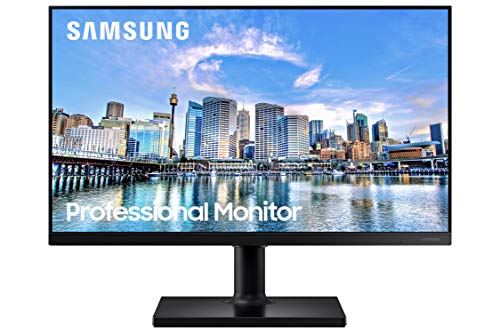
This 32-inch Samsung monitor fits best for someone who wants a big, simple desk screen for documents, web work, and casual gaming without paying for a more elaborate setup. The appeal is straightforward: a borderless 1080p panel, 75Hz refresh, FreeSync, and eye-comfort features in a size that gives you room to breathe on the desk. The trade-off is just as clear, though, because the same large 32-inch canvas sits on a 1920 x 1080 panel, so sharpness is more about comfort and scale than dense pixel detail.
I’d put this in the “good everyday monitor, not a specialist monitor” lane. Buy it if you want a roomy screen for office tasks, streaming, and light gaming, and skip it if you need a more adjustable stand or a higher-resolution workspace for dense text and side-by-side productivity. The value case is strong for the price band, but the fixed, basic stand keeps it from feeling fully premium.
| Screen size | 32 Inches |
|---|---|
| Resolution | FHD 1080p |
| Panel type | LCD |
| Refresh rate | 75 Hz |
| Response time | 8 Milliseconds |
| Brightness | 250 cd/m² |
The three-sided borderless design gives the screen a cleaner look and makes it easier to pair with a second monitor without a heavy visual seam between panels.
That matters if you care about a tidy desk or want the screen to feel larger than a standard 32-inch frame. The practical catch is that the design helps the visual experience more than the physical ergonomics, so it does not solve stand adjustment limits.
AMD FreeSync and the 75Hz refresh rate give this monitor a more fluid baseline than a plain 60Hz office display.
That is the right combination for mixed use, where scrolling, video, and light gaming all share the same screen. The limitation is simple: this is still a mainstream refresh-rate monitor, so buyers chasing a faster gaming route should not treat it like a high-refresh specialist.
Advanced Eye Care, Flicker Free support, and Eye Saver Mode are aimed at long sessions, while HDMI and DisplayPort keep the connection side uncomplicated.
That combination suits a monitor that may sit in front of you for hours at a time. The practical upside is lower daily friction, but the stand remains the bigger comfort issue because posture depends on the desk and base height more than on the panel itself.
For a desk with browser tabs, spreadsheets, and a few messaging windows open, the 32-inch size is the first thing that changes the feel of the setup. You get a lot of physical screen to work with, and the borderless design helps a multi-monitor arrangement sit cleanly side by side. At the same time, the 1920 x 1080 resolution on that size means text space is generous but not especially dense, so this is more about comfortable viewing than cramming in tiny windows.
When the day shifts from office work to a game or a video, the confirmed 75Hz refresh and AMD FreeSync matter more than marketing gloss. Fast movement has enough headroom to look smoother than a basic 60Hz office panel, and the adaptive sync support gives the monitor a better case for casual gaming or streaming than a plain productivity screen. It is not the kind of monitor you buy for high-end competitive play, but it does cover the common “work by day, play at night” routine well.
Setup is where the practical trade-off shows up most clearly. The HDMI and DisplayPort ports make it easy to plug into a desktop or console-style setup, and the plug-and-play theme comes through strongly in the buyer feedback pattern. The downside is ergonomics: the V-shaped base and lack of tilt or height adjustment make placement more important than it should be, especially on a shallow desk or a lower stand. If your workspace depends on dialing in screen height, this is the main reason to look elsewhere.
Community
The recurring pattern is easy to read: people are happiest when they want a big, clear, easy-to-use screen for work or everyday media, and less happy when the stand gets in the way of placement. The practical lesson is that this monitor wins on size, clarity, and convenience, but the basic support hardware can decide whether it feels like a bargain or a compromise.
Great picture and easy to set up.
Really good monitor. The slim bezel works well for multimonitor setups. Image is crystal clear. Vesa capability make it versatile. Would certainly recommend.
This works just fine for a monitor. The only thing I do not care for is the V shaped base, in my opinion it makes it hard to set it up on things like the printer stand I bought just for that purpose.
Big, easy setup. Nice image. These monitors are large. My intended use for these monitors is business office applications and database work.
| Attribute | Samsung LS32B304NWNXGO Current | Dell SE2425H | Samsung FT45 27" FHD 75Hz | Dell S2725DS Monitor - 27 Inch |
|---|---|---|---|---|
| Price | $142.49 | $144.99 | Out of stock | Out of stock |
| Screen size | 32 Inches | 23.8 inches | 27 inches | 27 Inches |
| Resolution | FHD 1080p | 1920 x 1080 | 1920 x 1080 | QHD Ultra Wide 1440p (2560 x 1440) |
| Panel type | LCD | VA | IPS | - |
| Refresh rate | 75 Hz | 75 Hz | 75 Hz | 100 Hz |
| Response time | 8 Milliseconds | 5 milliseconds | 5 milliseconds | 8 Milliseconds |
| Brightness | 250 cd/m² | - | - | 1199.1 lm |
| Editorial score | 68/100 | 73/100 | 78/100 | 76/100 |
Against the Samsung LS27DG302ENXZA, this Samsung is the calmer, more office-friendly route. The 27-inch model is built around 180Hz gaming with a 1 ms MPRT, which makes it the better pick if motion and competitive play matter most. This 32-inch LS32B304NWNXGO makes more sense if you want a larger, simpler screen for work, streaming, and casual gaming rather than chasing the fastest motion response.
Compared with the Amazon Basics 27E2UA, the Samsung gives you a bigger 32-inch canvas and a more clearly gaming-aware feature set with FreeSync and Game Mode. The Amazon Basics option is the cleaner fit if you want a 27-inch 75Hz IPS-style office monitor and do not need the extra size. This Samsung is the better buy when screen presence matters more than compactness, while the Amazon Basics route is easier to place on tighter desks.
Compare with
Add a second model to activate the direct comparison.



No products match that filter combination.
If you want a big, easygoing monitor that handles documents, video, and light gaming without fuss, this Samsung makes a strong case. The 32-inch size, 75Hz refresh, FreeSync, HDMI, DisplayPort, and eye-comfort features line up well with the price band, so it delivers a lot of practical screen for the money. Check the current offer if value is your main concern, because this is the kind of monitor that gets more attractive when discounted. Skip it if your desk setup depends on real stand adjustment or if you want a sharper 32-inch workspace for dense text and detailed multitasking. The basic base is the biggest everyday compromise, and the 1080p panel on a 32-inch screen is comfortable rather than crisp-dense. For buyers who can live with that trade-off, it is a sensible, broad-use monitor; for everyone else, a more adjustable or higher-resolution alternative is the better route.
Yes. The three-sided borderless design and slim bezel help the screen sit cleanly beside another monitor.
The stand is basic, and it does not offer tilt or height adjustment, so placement and ergonomics depend on your desk setup.
Review published on