
Weight
1.2 kg
Weight
The Apple MacBook Air 13.6-inch (M5) is aimed squarely at people who want a genuinely portable everyday laptop without stepping down to bargain-basement hardware. The appeal is easy to understand: a 2.71 lb chassis, 16GB of unified memory, a 512GB SSD, Wi-Fi 7, and Apple’s usual clean setup experience in a machine built for work, school, travel, and video calls. The real trade-off is just as clear: this is a light productivity-first MacBook, not the route for buyers who need lots of built-in ports or a laptop chosen mainly for sustained heavy creator workloads.
My quick verdict is that this is the right MacBook for most people who want speed, battery confidence, and low daily friction in a small bag-friendly size. It makes the most sense for students, office users, frequent travelers, and anyone moving up from an older Intel Mac, older M-series Air, or aging Windows laptop. Skip it if your buying decision depends on a broad port selection or if your work leans more toward workstation-class demands than thin-and-light convenience, because the Air’s strength is balance, not brute-force expansion.
| Screen size | 13.6 Inches |
|---|---|
| Resolution | 13.6-inch Liquid Retina display |
| Processor | Apple M5 chip |
| RAM | 16 GB |
| Storage | 512 GB SSD |
| Wireless connectivity | Wi-Fi 7 |
| Webcam | 12MP Center Stage camera |
| Input features | Touch ID |
At a price band around 5 GBP with a 0.44-inch profile, this is the kind of laptop that earns its place in a backpack instead of merely sounding portable in marketing.
That matters because weight and thickness affect whether you actually carry a laptop room to room, to class, or on a commute. The small footprint is a real quality-of-life advantage, though it also signals the usual thin-laptop compromise of fewer built-in connections than bulkier alternatives.
This version pairs the M5 chip with 16GB of unified memory and a 512GB SSD, which is a healthier starting point than ultra-basic laptop configurations that feel tight after a year.
For everyday multitasking, office apps, browser tabs, messaging, streaming, and light creative work, that balance is much easier to live with. The practical caveat is that buyers chasing workstation-style loads should still look higher up the Mac range rather than expecting an Air to replace a Pro-class machine.
The 12MP Center Stage camera, three microphones, four speakers, Wi-Fi 7, Bluetooth 6, and support for up to two external displays answer a lot of the questions people have about using a thin laptop as a serious daily computer.
In practice, that means cleaner video meetings, better flexibility at a desk, and less need to treat the Air as a secondary machine. The main limitation is port count, because strong wireless and display support do not eliminate the need for adapters if your setup is heavily wired.
Starting a normal workday is exactly where this MacBook Air makes its case. The combination of the M5 chip, 16GB memory, SSD storage, MagSafe charging, and two Thunderbolt 4 ports gives it the kind of clean start that suits classes, coffee-shop work, and home-office routines. There is enough memory and storage here to avoid the cramped feeling that older base configurations can create, and the separate MagSafe port matters because it leaves both Thunderbolt ports free when you are charging. The tension is that two data ports are still two data ports, so a desk with multiple wired accessories can push you toward a hub faster than a thicker laptop would.
Once you settle in for writing, browsing, and document work, the 13.6-inch size looks well judged rather than tiny. Text clarity is a core strength of Apple’s Liquid Retina panels, and the compact footprint of an 11.97 x 8.46-inch body makes it easy to place on a crowded desk or tray table. This is the kind of laptop that encourages long stretches of email, notes, research tabs, and light photo work without making the machine itself the story. The compromise is simple and familiar: if your comfort depends on a larger canvas for side-by-side windows all day, the portability win comes with less breathing room than a 15-inch model.
Video calls and media use land in a reassuringly modern place. A 12MP Center Stage camera, three-mic array, four-speaker system with Spatial Audio, headphone jack, Wi-Fi 7, and support for up to two external displays make this feel ready for hybrid work rather than merely acceptable for it. In a typical call setup, the camera and mic package should feel like an upgrade from older thin laptops, and the wireless update matters if your home network can take advantage of it. One owner moving from an older Wi-Fi 6 Air even described a major jump in real wireless speed, which is the kind of practical upgrade that changes cloud backups, downloads, and large file transfers.
Mobility is the part that gives this model its strongest identity. At 2.71 lb and just 0.44 inches thick, it is easy to picture carrying this from class to couch to office without thinking twice, and the fanless Air design keeps the experience quiet. Battery claims go up to 18 hours, and the broader pattern around this machine points to all-day confidence for normal work rather than charger anxiety by midafternoon. The trade-off is that this is still an Air: if your day includes sustained heavy rendering or a permanently docked desktop-style setup with lots of peripherals, the portability-first design stops being the main advantage.
Community
The recurring takeaway is that this MacBook Air wins people over with speed, light weight, battery life, and the feeling that Apple finally gives the base 13-inch Air enough memory and storage to feel complete. The most useful lesson is that the upgrade is especially satisfying for people coming from older Airs, older Windows laptops, or heavier Pro models they no longer want to carry.
I’ve owned many Apple laptops and this one hit the sweet spot for me because it is lighter than a Pro, gives me more storage than my old Air, and the Wi-Fi 7 upgrade made a real difference on my fast home internet.
For me this feels like the ultimate laptop, with instant performance, 16GB RAM, excellent battery life, and a Midnight finish that makes it feel special every time I open it.
This was my first Mac after years on an old Windows computer, and the jump felt huge because it was fast, sleek, light, and easy to enjoy once I got used to macOS.
Moving from an M1 Air to this M5 Air felt like a major everyday upgrade because it runs faster, stays cool and quiet, and adds the kind of screen, webcam, speaker, and Wi-Fi improvements I actually notice.
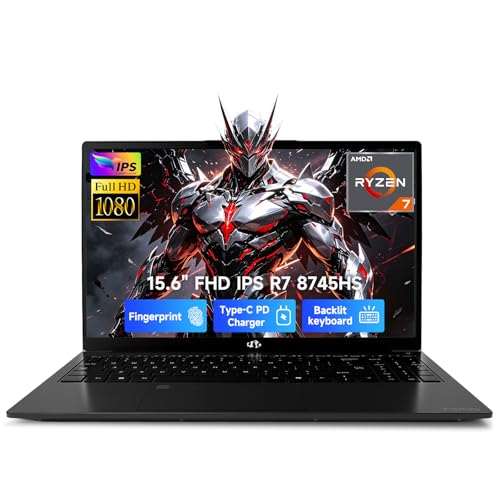
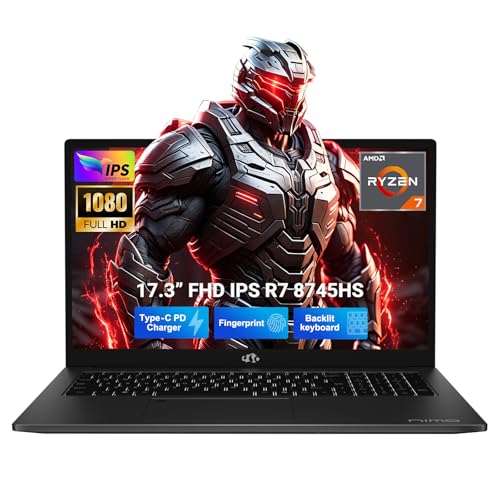
| Attribute | Apple MacBook Air 13.6-inch Current | NIMO 15.6 IPS FHD Gaming | NIMO 17.3-inch Gaming-Creator Laptop |
|---|---|---|---|
| Price | $1,234.00 | Out of stock | - |
| Screen Size | 13.6 Inches | 15.6 Inches | - |
| Resolution | 13.6-inch Liquid Retina display | 1920 x 1080 pixels | - |
| Processor | Apple M5 chip | AMD Ryzen 7 8745HS | AMD Ryzen 7 8745HS, 8 cores |
| RAM | 16 GB | 32 GB | 32 GB RAM |
| Storage | 512 GB SSD | 1024 GB | 1 TB SSD |
| Editorial score | 91/100 | 74/100 | 68/100 |
Against a larger 15-inch MacBook Air route, this 13.6-inch model is the better pick if your priority is mobility, smaller-bag convenience, and one-hand carry around the house, office, or campus. Choose the 15-inch direction instead if you spend long days with multiple windows open and want more visual breathing room without stepping into Pro pricing. The smaller Air gives up some workspace, but it keeps the travel-friendly character that defines the line.
Compared with a MacBook Pro route or premium Windows ultrabooks like Dell XPS or Microsoft Surface Laptop, this Air leans harder into quiet portability and low-friction daily use. It is the smarter buy for people whose workload is mostly writing, browsing, meetings, media, and light creative tasks, especially if battery life and silent operation matter more than extra ports or heavier sustained performance. Pick the Pro-style alternative if your setup is more desk-bound, more accessory-heavy, or more dependent on long stretches of demanding professional workloads.
Compare with
Add a second model to activate the direct comparison.



No products match that filter combination.
The clearest reason to skip it is not lack of quality but mismatch of priorities. If you want lots of built-in ports, a larger screen for constant multitasking, or a laptop chosen mainly for heavier sustained professional workloads, this Air stops being the obvious answer. For everyone else, especially buyers who value portability, quiet operation, and a fast no-fuss daily computer, this is one of the easiest MacBooks to recommend.
Yes. The light 2.71 lb build, 13.6-inch display, 16GB memory, 512GB SSD, long battery claim, and strong webcam setup make it a very natural fit for classes, writing, browsing, meetings, and everyday productivity.
Port selection and screen size. You get two Thunderbolt 4 ports, MagSafe, and a headphone jack, which is enough for many people, but a heavily wired desk or buyers who want a larger built-in workspace may be better served by a bigger or more connectivity-focused laptop.
Review published on