
NIMO 15.6 IPS FHD Gaming Laptop - Review and opinions


Quick verdict
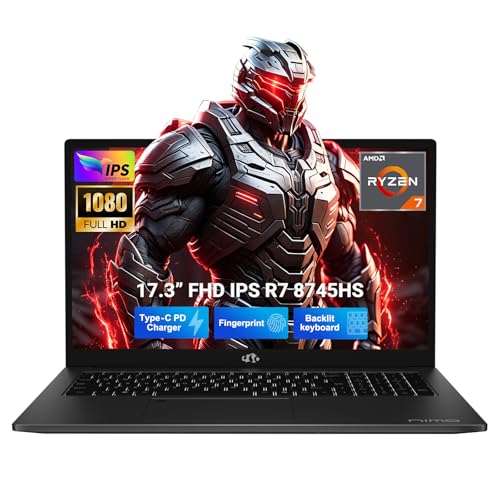
If you want a Windows laptop that can handle schoolwork, creative apps, and light-to-serious gaming without jumping into a bulkier workstation, this NIMO lands in a useful middle lane. The Ryzen 7 8745HS, 32 GB of RAM, and 1 TB SSD give it real headroom for multitasking and storage, while the 15.6-inch Full HD screen keeps the footprint familiar. The trade-off is that the value here depends on how much you care about integrated graphics versus a more clearly gaming-focused machine.
I would place this with buyers who want a fast all-rounder for editing, streaming, and everyday productivity, not someone chasing the clearest gaming identity or the longest unplugged workday. The 100W USB-C charging, fingerprint login, backlit keyboard, and numpad make it easy to live with at a desk, but the integrated Radeon 780M keeps the route closer to creator-capable than to dedicated-GPU gaming territory.
| Screen size | 15.6 Inches |
|---|---|
| Resolution | 1920 x 1080 pixels |
| Processor | AMD Ryzen 7 8745HS |
| RAM | 32 GB |
| Storage | 1024 GB |
| Graphics | Integrated Radeon 780M |
Performance headroom
The Ryzen 7 8745HS, 32 GB of RAM, and 1 TB SSD form the core of the appeal here. That combination gives the laptop room for heavier multitasking, large files, and creative apps without the immediate pressure that comes with smaller memory and storage configurations.
The practical upside is that it fits a buyer who wants one machine for work, study, and media creation. The caution is simple: the Radeon 780M is integrated graphics, so this is a strong all-rounder rather than a dedicated-GPU gaming tower.
Easy daily handling
The backlit keyboard, fingerprint reader, and numpad make the laptop easier to live with in normal desk use. Logging in is quick, typing in dim rooms is less awkward, and the numpad helps anyone who spends time in spreadsheets or finance-style input.
That matters because small convenience features add up over a full day. The trade-off is that the keyboard layout takes up space, so this is better for comfort and productivity than for the smallest possible chassis.
Charging and mobility
The 100W USB-C PD charging route is a real convenience for travel and mixed-device setups. One cable can cover the laptop side of the equation, which cuts down on charger clutter and makes it easier to pack for class, office use, or short trips.
The upside is simpler carrying and less adapter dependence. The limitation is that this is still a 15.6-inch Windows laptop, so it is more believable as a move-between-desks machine than as a featherweight all-day commuter.
Performance and experience
At a desk with browser tabs, documents, and a video call open, the combination of Ryzen 7 power, 32 GB of memory, and a 1 TB SSD is the part that matters most. That is the kind of setup that keeps a busy Windows day from feeling cramped, and it gives you enough storage room for projects, downloads, and media without immediately living in cleanup mode. The downside is that this is built around integrated graphics, so the comfort zone is productivity and creation first, not a machine that wins on sheer gaming hardware.
For writing sessions, the full-size US keyboard with backlighting and numpad changes the feel in a practical way. The layout is friendlier for spreadsheets, data entry, and long typing stretches than a compact 15.6-inch design, and the fingerprint reader trims a little friction at sign-in. The trade-off is desk width and a slightly more work-focused footprint, which is fine if you want a laptop that behaves like a serious daily driver rather than a stripped-down travel companion.
The 15.6-inch Full HD panel keeps the format easy to place in a dorm, home office, or shared table setup, and the 180-degree hinge adds flexibility when you want to flatten the screen for quick collaboration. At this size and resolution, text and windows land in a comfortable mainstream zone for study and office work, not an ultra-dense premium tier. That makes the display fit the price lane well, but buyers who spend long hours on color-critical work or want a more obviously premium panel class will have a clearer reason to look elsewhere.
Pros
- Strong multitasking setup with Ryzen 7, 32 GB RAM, and 1 TB SSD.
- Useful desk-friendly extras like backlit keys, fingerprint login, and a numpad.
- USB-C PD charging reduces charger clutter and makes travel easier.
- 15.6-inch Full HD format stays comfortable for everyday work and study.
Cons
- Integrated graphics limit how far it goes for serious gaming compared with dedicated-GPU alternatives.
- The 15.6-inch layout is practical, but it is not the smallest or lightest route for frequent commuting.
- The display is Full HD rather than a more premium panel class, so color-focused buyers may want a stronger screen-first option.
Community
User reviews
The strongest reaction around this model is that it wins on practical comfort more than flashy positioning. The fast storage, roomy memory, and light-feeling everyday use are what make it attractive, while the main hesitation is whether integrated graphics is enough for the buyer’s real workload.
Comparison
| Attribute | NIMO 15.6 IPS FHD Gaming Current | NIMO 17.3-inch Gaming-Creator Laptop | Apple MacBook Air 13.6-inch |
|---|---|---|---|
| Price | Out of stock | - | $1,236.69 |
| Screen Size | 15.6 Inches | - | 13.6 Inches |
| Resolution | 1920 x 1080 pixels | - | 13.6-inch Liquid Retina display |
| Processor | AMD Ryzen 7 8745HS | AMD Ryzen 7 8745HS, 8 cores | Apple M5 chip |
| Graphics | Integrated Radeon 780M | Integrated AMD Radeon 780M | - |
| RAM | 32 GB | 32 GB RAM | 16 GB |
| Storage | 1024 GB | 1 TB SSD | 512 GB SSD |
| Editorial score | 74/100 | 68/100 | 91/100 |
Against the Acer Nitro V, this NIMO looks more like the balanced creator-and-study route, while the Nitro V is the more obvious gaming pick with its dedicated RTX 3050 and 144 Hz panel. Choose the NIMO if you care more about memory, storage, and everyday Windows comfort; choose the Acer if gaming identity and higher-refresh play matter more.
Compared with the Dell DC16251, the NIMO gives you more RAM and storage headroom and a more performance-tilted AMD platform, while the Dell’s 16-inch 1920 x 1200 format reads as the more office-first alternative. If you want a broader work screen and a mainstream productivity feel, the Dell lane makes sense; if you want more local storage and a stronger multitasking spec, the NIMO is the sharper value route.
Compare with Compare this model This product stays fixed; add a recommended alternative or search another model in the category.
Compare with
Add a second model to activate the direct comparison.
Recommended models


No products match that filter combination.
Is the NIMO 15.6 IPS FHD Gaming laptop worth it?
This is a smart buy for someone who wants a roomy, fast Windows laptop for study, editing, streaming, and everyday multitasking without paying for a more specialized workstation. The 32 GB RAM and 1 TB SSD give it a strong practical base, the keyboard extras help in daily use, and the 100W USB-C charging makes the whole package easier to live with. If the current offer is in the same rough band as other performance-minded 15.6-inch laptops, this is a compelling value route. Skip it if your priority is dedicated-GPU gaming, a more premium display, or the smallest possible travel machine. The integrated graphics and 15.6-inch format define the trade-off clearly, so this is best for buyers who want comfort and headroom more than a pure gaming badge or ultralight portability.
FAQ
Is this better for school and office work than for gaming?
Yes. The Ryzen 7, 32 GB RAM, 1 TB SSD, backlit keyboard, and numpad make it easy to live with for study and productivity, while the integrated Radeon 780M keeps gaming more in the mainstream than the enthusiast lane.
Does it charge conveniently for travel?
Yes. The 100W USB-C PD charging setup is a real convenience because it reduces charger bulk and makes the laptop easier to pack with other USB-C gear.
Review published on