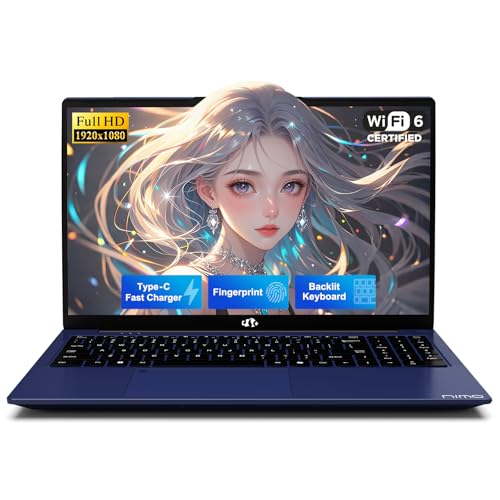
Review Laptops NIMO

NIMO 17.3 IPS Gaming Laptop - Review and opinions

Price in usual range
See on Amazon
Review updated on
68 /100 Overall

Score

Mobility and battery 45/100
Display and format 69/100
Daily usability 80/100
Performance and configuration 74/100
Ports and connectivity 65/100
Customer reviews 71/100

Screen size

17.3 in Screen size
Top 3 for screen size

Is it worth it?

If you want a big-screen Windows laptop for editing, streaming, schoolwork, and general multitasking, this NIMO makes sense because it pairs a Ryzen 7 8745HS with 32GB of RAM, a 1TB SSD, and a 17.3-inch display in a package that still stays under 2.1 kg. That combination is the real draw: plenty of headroom for browser-heavy days and creator apps without jumping to a bulkier workstation class. The trade-off is that this is still an integrated-graphics machine, so it fits creators and light gaming better than buyers chasing a true high-end gaming rig.

I would put this in the hands of someone who wants a large, comfortable Windows laptop with strong everyday speed, a backlit keyboard, fingerprint login, and USB-C fast charging, not someone who needs maximum graphics muscle or a clearly defined premium display route. The 17.3-inch format and 180° hinge make it easy to spread out on a desk, but the same size also makes it a poor match for buyers who want a compact carry-first machine.

Screen Size 17.3 Inches
RAM 32 GB
Storage 1 TB SSD
Operating System Windows 11

Big-screen workspace

The 17.3-inch format is the feature you notice first because it changes how the laptop fits into daily use. There is more room for documents, editing timelines, and split windows, which reduces constant zooming and tab switching.

That extra comfort matters most if the laptop spends its life on a desk or kitchen table. The downside is simple: a large screen makes the whole machine less convenient for tight commutes and small bags, so the size is a benefit only if you actually use it like a desktop replacement.

Fast daily setup

The Ryzen 7 8745HS, 32GB of RAM, and 1TB SSD create the kind of setup that opens the day cleanly and leaves room for heavier multitasking. It is the combination that matters, not any single spec on its own.

In practical terms, that means fewer pauses when you keep several apps open and enough storage for large projects, media, and files without immediate pressure to offload. This is the right kind of configuration for someone who wants speed to stay invisible during work, study, or light creative use.

Keyboard, login, and charging

The backlit keyboard, fingerprint reader, and 100W USB-C PD charging are the everyday convenience pieces that change how the laptop feels outside a benchmark mindset. They make it easier to type in dim rooms, sign in quickly, and keep the charger route simple.

That combination lowers friction for commuting between rooms, classrooms, and offices. The caveat is that the charger is part of the story here, so the laptop is most convincing when you accept a modern USB-C charging setup instead of expecting all-day untethered freedom.

Use evaluation

On a desk with a browser, documents, chat, and a video call open, the first thing that matters here is not raw headline speed but how much room the 17.3-inch panel gives you to work without feeling cramped. The display size alone creates a more relaxed layout for writing and side-by-side windows, and the 32GB RAM plus SSD combination keeps that kind of daily multitasking in a comfortable lane. For office work and school use, that is a meaningful step up from the usual budget laptop shuffle.

The keyboard and fingerprint reader make the workday start cleaner than a lot of large laptops at this size. A backlit US layout with a numpad is a practical fit for spreadsheets, data entry, and long typing sessions, while the touchpad fingerprint login removes some of the usual Windows friction. The trade-off is desk width: once you add the numpad and 17.3-inch chassis, this is more of a portable desktop replacement than a lap-friendly travel machine.

For creator work, the Ryzen 7 8745HS and Radeon 780M give the machine enough room for editing timelines, streaming, and AI-assisted tasks without immediately feeling underpowered. The same setup also explains the limit: integrated graphics keep it in the light-to-moderate gaming and content-creation lane rather than the high-end gaming lane. That makes it a sensible buy for people who value responsiveness, storage headroom, and a large screen more than chasing the fastest frame rates.

Pros

  • Large 17.3-inch screen is better for split-window work and long sessions.
  • 32GB RAM and 1TB SSD give the machine real breathing room for multitasking and files.
  • Backlit keyboard, fingerprint login, and USB-C fast charging reduce everyday friction.
  • 2-year warranty adds a useful support cushion for a laptop meant to be used often.

Cons

  • Integrated graphics keep it out of the true high-end gaming class.
  • The 17.3-inch body is less convenient for frequent travel and small desks.
  • The display is listed as FHD in one place and up to 4K in another, which makes the screen route less cleanly defined than the core hardware.

Community

User reviews

The opinion pattern is consistent: people tend to praise the speed, the warranty, and the way the laptop handles school, office, and beginner creator use, while the main hesitation is whether the size and graphics route match the buyer’s real workload. The practical lesson is that this is a strong fit for buyers who want a roomy, fast Windows machine, not for anyone whose priority is compact portability or serious gaming headroom.

O.C.C

My old PC could not handle Windows 11 well, and this one is much faster than what I had before.

Robert Simpson

I bought this as a beginner music studio and it has been a beast, with an awesome warranty and fast delivery.

NormT

I got it for school and I love the warranty that came with it, plus the boot-up is fast.

Comparison

Attribute NIMO 17.3 IPS Gaming Current NIMO 15.6 IPS FHD Gaming Apple MacBook Air 13.6-inch
Price $949.99 $849.99 $949.00
Screen Size 17.3 Inches 15.6 Inches 13.6 Inches
RAM 32 GB 32 GB 16 GB
Storage 1 TB SSD 1024 GB 512 GB SSD
Editorial score 68/100 71/100 81/100

Against the HP ProBook 460 G11, this NIMO leans harder into screen size and creator-friendly headroom. The ProBook’s 16-inch, 1920 x 1200, Ryzen 7 7735U, 16GB setup reads more like a mainstream office machine, while the NIMO gives you more RAM, more storage, and a larger panel for people who keep more windows open at once. Choose the HP if you want a more restrained office route; choose the NIMO if the bigger workspace matters more than a lighter business-first feel.

Compared with the Dell DC16251, the NIMO again wins on memory and storage capacity, while the Dell’s 16-inch, 1920 x 1200, Intel Core 7, 16GB layout keeps it closer to a balanced general-use lane. The NIMO is the better fit for buyers who want a roomier screen and more local headroom for files and multitasking, while the Dell route makes more sense if you want a simpler mainstream laptop shape without committing to the larger 17.3-inch footprint.

Compare with Compare this model This product stays fixed; add a recommended alternative or search another model in the category.

Compare with

Add a second model to activate the direct comparison.
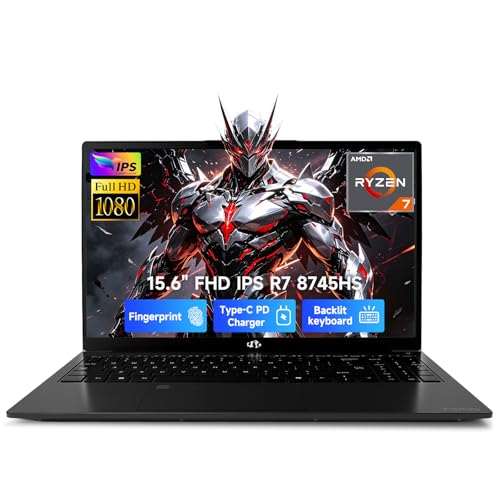
Is the NIMO 17.3 IPS Gaming laptop worth it?

This is a strong buy for someone who wants a large Windows laptop with real multitasking room, quick sign-in, fast USB-C charging, and enough CPU and RAM headroom to handle school, office work, editing, and streaming without feeling cramped. If that is the route you want, the 17.3-inch format and 1TB/32GB configuration make the value case easy to understand, especially if the current offer is in a sensible range for you. The clearest reason to skip it is graphics ambition or frequent carry use. Integrated graphics keep it out of the serious gaming lane, and the 17.3-inch body is simply less convenient than a smaller clamshell when portability is the priority. For buyers who want a more compact everyday laptop, a 16-inch mainstream alternative is the cleaner fit.

See the best price on Amazon Check for today's deals. Free shipping with Prime.

FAQ

Is this better for office work or gaming?

It is better for office work, school, streaming, and creator tasks than for demanding gaming, because the graphics are integrated rather than a dedicated gaming GPU.

Does it travel well?

It is light for a 17.3-inch laptop at under 2.1 kg, but the large chassis still makes it more desk-friendly than truly travel-friendly.

Editorial team

PC Gear Reviews editorial team

The PC Gear Reviews editorial team reviews product specs, prices, availability, visible customer feedback, and buying signals to keep reviews useful and up to date.