
RAM
32 GB
RAM
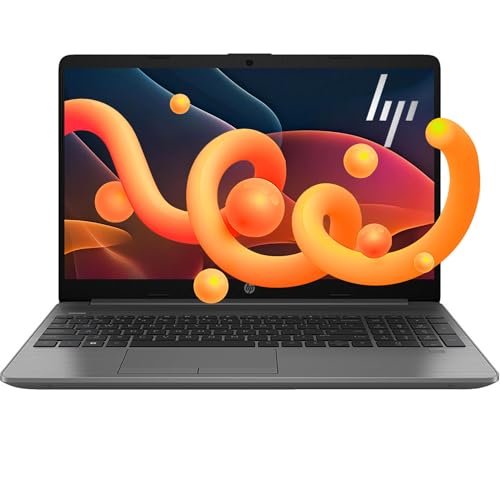
The HP G10 raises a more useful question than whether a Ryzen 3 laptop can handle basic tasks: can a Windows 11 Pro machine with generous memory, a 1TB SSD, a numeric keypad, and a practical port selection replace a home-office desktop without becoming a poor travel companion? It fits students, remote workers, and households that want a large Full HD screen and enough headroom for documents, browser tabs, video calls, streaming, and business software. The trade-off is a 15.6-inch chassis with no backlit keyboard, modest display brightness, integrated graphics, and battery expectations that do not support a confident all-day-away-from-the-outlet pitch.
Buy the HP G10 for mainstream office and home use where Windows 11 Pro, a numeric keypad, HDMI, USB-C, and abundant memory matter more than premium mobility or creative horsepower. Skip it for serious gaming, sustained drawing or workstation workloads, or long days away from a charger. There is also a configuration clarity issue around the advertised memory and storage tiers, so this is a better fit for buyers comfortable with the stable 32GB/1TB configuration than for anyone whose purchase depends on a precisely defined higher-capacity variant.
| Screen size | 15.6 inches |
|---|---|
| Resolution | 1920 x 1080 pixels |
| RAM | 32 GB |
| Storage | 1 TB |
| Panel type | IPS |
The 32GB RAM and 1TB SSD configuration gives office work, school software, media, and large collections of documents useful breathing room.
It is a strong everyday combination for buyers who keep many tabs open, but capacity alone does not make the Ryzen 3 platform suitable for demanding video production or modern high-end games.
The 15.6-inch Full HD IPS panel provides a comfortable workspace for spreadsheets, reading, and streaming, while anti-glare coating helps in ordinary indoor lighting.
The 250-nit brightness and 45% NTSC coverage keep the sensible route to office, study, and entertainment rather than outdoor use or color-sensitive design.
HDMI, USB-C, two USB Type-A ports, Wi-Fi 6, Bluetooth, and a numeric keypad make the laptop easy to integrate into a conventional desk.
The practical compromise is input comfort in low light, since the keyboard is not backlit, and biometric sign-in is not part of the setup.
Start a normal workday with a browser, documents, messaging, and a CRM open, and the combination of a Ryzen 3 7330U, 32GB of RAM, and a 1TB SSD puts the HP G10 in a comfortable everyday-performance lane. The four-core processor is aimed at responsive office and study work rather than demanding production, while the memory leaves room for many browser tabs without making the laptop feel immediately constrained. The buyer payoff is straightforward multitasking; the limit is that integrated graphics do not turn this into a gaming or workstation machine.
At a desk, the 15.6-inch 1920-by-1080 IPS display gives documents and streaming enough space to avoid the cramped feel of smaller laptops. That resolution works out to roughly 141 pixels per inch, a sensible balance for text and media at this size. Anti-glare treatment helps with reflections, but the stated 250-nit brightness and 45% NTSC coverage make this more convincing for indoor rooms than bright window-side work or color-critical creation. The screen is a practical strength, not a reason to buy it as a creator display.
Move from typing to a video call and the webcam, Wi-Fi 6, Bluetooth, and headphone/microphone combo cover the basic home-office route without requiring a separate camera or wireless adapter. The numeric keypad is useful for spreadsheets and data entry, while the non-backlit keyboard becomes a genuine nuisance in dim rooms. Windows Hello is not available through the webcam, and there is no fingerprint reader, so login convenience and biometric security are more limited than the Windows 11 Pro label might imply.
For a home setup, the port layout is unusually easy to place: two USB Type-A ports, one USB Type-C port, HDMI, and the combined headphone/microphone jack cover common accessories and an external display. That reduces adapter dependence for a monitor, mouse, drive, or headset. The 15.6-inch format still occupies more desk and bag space than a compact 13-inch laptop, and the mixed battery experience makes this a carry-between-rooms computer more convincingly than a full-day commuter machine.
Community
The overall ownership picture is favorable for speed, setup, everyday work, and value, especially when the laptop is used for CRM tasks, school, calls, and streaming. The recurring cautions are more practical than glamorous: battery life can disappoint, the keyboard lacks backlighting, one buyer reported a failure after four months, and biometric login is unavailable. The lesson is to buy it as a capable home-office laptop, not as a premium mobile or specialist machine.
I absolutely love it. It is so fast and works great.
I have been very happy with it so far. It seems very fast and has great battery life, but the keyboard is not backlit.
I like the size because it is easy to carry while still being large enough to get a lot done. It was easy to use right out of the box for movies, school, work, and video calls, although the battery did not last as.
It worked well at first but became unusable after four months, and repairing it while saving the data would have cost at least half the computer.
| Attribute | HP G10 Current | HP 255 G10 | HP 15.6-inch Touch Laptop | KAIGERR LX15 |
|---|---|---|---|---|
| Price | $629.99 | $699.99 | $649.99 | $619.99 |
| Screen size | 15.6 inches | - | - | 15.6 inches |
| Resolution | 1920 x 1080 pixels | - | - | 1920 x 1080 pixels |
| RAM | 32 GB | 16 GB RAM | 32 GB RAM | 16 GB DDR4 |
| Storage | 1 TB | 1 TB SSD | 1 TB PCIe NVMe SSD | 512 GB M.2 NVMe SSD |
| Editorial score | 77/100 | 65/100 | 63/100 | 73/100 |
Against the Lenovo V15 G2 ALC, the HP G10 offers the stronger stated memory and storage configuration, with 32GB RAM and 1TB storage compared with the Lenovo's 16GB and 512GB. Choose the HP for heavier browser multitasking, larger local files, and Windows 11 Pro features; choose the Lenovo route when a simpler office configuration is enough and you prefer not to pay for capacity you will not use.
The Apple MacBook Neo represents a different priority: a smaller 13-inch display, 2408-by-1506 resolution, Apple A18 Pro chip, and 8GB RAM favor a more compact platform and a different operating-system ecosystem. The HP makes more sense for buyers who need Windows business software, a numeric keypad, HDMI, and a larger working surface. The MacBook route is the cleaner choice when compact size and Apple platform integration matter more than ports, keypad layout, or Windows compatibility.
Compare with
Add a second model to activate the direct comparison.




No products match that filter combination.
The HP G10 is a sensible home-office and study laptop when the priority is a roomy 15.6-inch screen, Windows 11 Pro, substantial memory, 1TB storage, a numeric keypad, and enough ports to avoid a desk full of adapters. Its strongest case is practical multitasking at around the mainstream price tier, and it is worth considering when the current offer is competitive. Skip it if a long unplugged workday, backlit typing, biometric login, serious gaming, or professional creative work is non-negotiable. The reported early failure also makes this a less comfortable choice for irreplaceable work data than a more clearly established alternative. For buyers who value capacity and office convenience over mobility and premium extras, the HP G10 remains the better-defined route.
Yes. Its Ryzen 3 7330U processor, 32GB RAM, 1TB SSD, Windows 11 Pro, Full HD IPS screen, webcam, and office-friendly ports fit documents, browser work, CRM software, calls, streaming, and school applications.
Only at a modest level. Integrated graphics and the entry-level Ryzen 3 platform make it a poor choice for demanding games, advanced drawing workloads, or sustained creator software.
Review published on