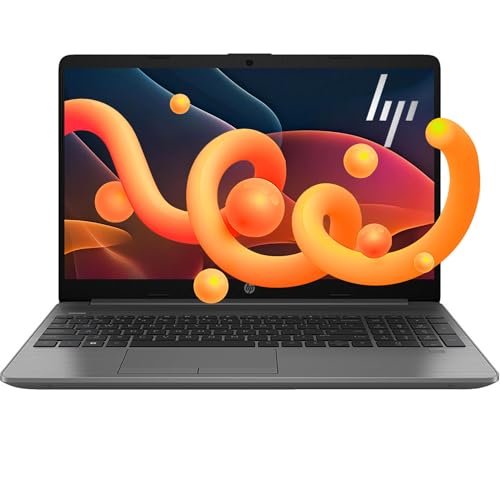
Review Laptops NIMO

NIMO N157 Laptop - Review and opinions

NIMO N157
74 /100 Overall

Quick recommendation

Value for money 78/100
Ease of use 73/100
Durability 63/100
Customer reviews 84/100

Is it worth it?

The NIMO N157 fits best for a student or everyday office buyer who wants a roomy 15.6-inch screen, a large SSD, and enough memory to keep browser tabs, documents, and calls moving without constant slowdowns. Its appeal is straightforward: 16 GB of RAM, a 1 TB SSD, Wi-Fi 6, and a backlit keyboard make it easy to picture as a daily carry for class or desk work. The trade-off is that this is not a premium all-rounder; the value is in the configuration and warranty, not in a polished flagship feel.

I would put this in the buy-it-for-school-or-home-work lane, especially if you want a modern-feeling Windows laptop with a fingerprint reader, USB-C charging, and a numpad. Skip it if you need a clearly defined performance machine, a creator laptop, or a model with stronger long-term confidence than a small-review-count budget build usually offers. The practical compromise is that the spec package looks strong for the money, while the brand’s broader reliability story is still the part that keeps the verdict from getting more aggressive.

Screen Size 15.6 Inches
Resolution 1920×1080
Processor Intel N150
RAM 16 GB
Storage 1024 GB
Wireless Wi-Fi 6, Bluetooth 5.2

Key features

Big storage, real headroom

The 1 TB SSD and 16 GB of RAM are the configuration’s biggest practical strengths. They matter because they keep the laptop from feeling boxed in by tabs, downloads, class files, and everyday apps.

That combination also explains why the machine reads as a value play rather than a bare-minimum budget pick. The caveat is simple: the storage and memory are generous, but the overall route still fits mainstream work more than demanding creator or gaming use.

Comfort-first screen size

The 15.6-inch 1920×1080 display gives enough room for reading, streaming, and side-by-side windows without making the text feel cramped. The anti-glare finish and slim-bezel design support longer sessions at a desk or in a classroom.

This is the sort of screen that makes sense for school and office routines, especially when the laptop is being used for documents and web work. It is not a spec that turns the machine into a visual showcase, but it does make the daily experience easier to live with.

Convenient login and charging

A fingerprint reader, backlit keyboard, and 65W Type-C charging cover three of the most common everyday pain points. They make first unlock, low-light typing, and power-up less annoying than they are on many low-cost laptops.

That matters because these are the features you notice every day, not just on the first setup. The practical downside is that the machine’s convenience comes from utility features, not from a clearly premium chassis or a standout battery story.

Wireless and port-friendly basics

Wi-Fi 6 and Bluetooth 5.2 give the N157 current-generation connectivity for calls, accessories, and normal home or campus use. The included USB-C charging setup also helps keep the desk cleaner.

This is a sensible baseline for a student laptop, especially if you move between rooms or rely on wireless accessories. It does not turn the laptop into a connectivity specialist, but it keeps the everyday setup straightforward.

User experience

At a desk with a browser, a document, and a video call open, the N157 has the kind of setup that keeps the workday from feeling cramped. The 15.6-inch 1080p panel gives you about 141 pixels per inch, which is a comfortable middle ground for reading and split-screen schoolwork without pushing into tiny-text territory. That size and resolution combination makes sense for long note-taking sessions and streaming between tasks, while the anti-glare treatment and slim bezels support the kind of everyday viewing comfort that matters more than marketing language does.

The keyboard and touchpad route is also practical rather than flashy. A backlit keyboard, fingerprint login, and numeric keypad make sign-in and late-night typing easier, and the touchpad fingerprint integration reduces one more small friction point at startup. For writing papers, entering numbers, or moving between apps, that is the sort of daily convenience that adds up. The trade-off is desk space: the numpad helps productivity, but it also makes the chassis feel more like a full-size carry than a minimalist ultraportable.

Performance-wise, the 16 GB RAM and 1 TB SSD are the real comfort pieces, and that matches the strongest recurring theme in the buyer feedback. Boot speed, app switching, and storage headroom are the reasons this machine lands as a good value for school, light office work, and general home use. The one caution is route fit: the N150 is a sensible everyday chip, but the product is better judged as a responsive student laptop than as a machine for heavy creative work or serious gaming.

On the move, the included 65W USB-C charger and 6.56-foot USB-C cable reduce adapter clutter, which makes the laptop easier to live with than many budget models that still lean on awkward power bricks. Wi-Fi 6 and Bluetooth 5.2 round out the daily-use picture for calls, streaming, and room-to-room use. The remaining question is not whether it can cover basic mobility, but whether the build and battery behavior match your own tolerance for a lower-cost machine that is meant to be carried and used, not admired.

Pros

  • 16 GB RAM and 1 TB SSD give it real day-to-day headroom.
  • 15.6-inch FHD anti-glare screen suits school and office work.
  • Backlit keyboard, fingerprint reader, and USB-C charging improve convenience.
  • Wi-Fi 6 and Bluetooth 5.2 keep the wireless basics current.

Cons

  • The N150 route is better for everyday work than for demanding creative or gaming loads.
  • Battery life is not positioned as a standout feature.
  • The budget build and small review base leave less long-term confidence than a more established mainstream laptop.
  • The SSD choice has been a pain point for at least one buyer.

Community

User reviews

The pattern is easy to read: people are most convinced by the fast feel, the roomy storage, and the way the laptop handles school or office tasks without drama. The disappointments show up when the SSD, connectivity, or long-term reliability become the focus, which makes this a better fit for buyers who want a strong everyday configuration than for buyers who need the safest possible long-haul bet.

User

I recently purchased the NIMO 15.6" IPS FHD Student Laptop and have been pleasantly surprised by how much performance it offers for the price.

Roland

This laptop works great.it is fast and easy to work on. Definitely recommend this item. Good quality and very good support.

User

Mostly a great laptop. The only let down was the Kingston SSD. I replaced it with a Samsung 990 and this system really flies now.

Amz

I’ve been using this laptop for about two months, mainly for light tasks like internet browsing and viewing trail cam footage. While the hardware is clearly powerful and probably great for gaming or heavy-duty apps.

Comparison

Against a typical Chromebook or very basic Windows laptop, the N157 is the stronger pick if you want more storage, more memory, and a fuller Windows setup for school or home work. It is the better route for buyers who keep lots of tabs, files, and apps open, while the simpler alternative still makes sense if web-first use and lower cost matter more.

Compared with a mainstream thin-and-light like an HP Pavilion or Lenovo IdeaPad class machine, the NIMO leans harder on spec density and convenience features such as fingerprint login, backlit keys, and USB-C charging. Choose the NIMO if you want the stronger configuration for the money; choose the more established mainstream route if brand confidence, finish, and broader model maturity matter more than raw storage and RAM.

Conclusion and verdict

The NIMO N157 makes the most sense for buyers who want a roomy, modern-feeling student laptop with strong everyday specs and simple convenience features. If your priority is fast booting, enough memory for multitasking, a full-size keyboard with a numpad, and USB-C charging, this is a convincing value route, especially if the current offer is priced like a budget-to-midrange machine. If you want the safer long-term buy, or if your use leans toward heavy creative work, gaming, or brand-first confidence, this is not the cleanest choice. The configuration is appealing, but the durability story is still more modest than the spec sheet energy suggests, so I would treat it as a smart everyday purchase rather than a do-everything anchor.

Still, compare NIMO N157 with close alternatives if warranty, noise, real battery life, or included accessories are decisive for you.

FAQ

Is it a good fit for school and office work?

Yes. The 15.6-inch FHD screen, 16 GB of RAM, 1 TB SSD, backlit keyboard, and fingerprint reader make it a practical everyday Windows laptop for documents, browsing, and classes.

Does it look like a serious gaming laptop?

No. The confirmed route is everyday productivity, not gaming performance, so it makes more sense for study and office use than for buyers who want a dedicated gaming machine.

Jake Miller

About the author

Jake Miller

As a passionate tech enthusiast, I review the latest PCs, laptops, and hardware components. With detailed tests and honest insights, I aim to help users build or buy the perfect setup for their needs.