
Price
$50-$100
Price
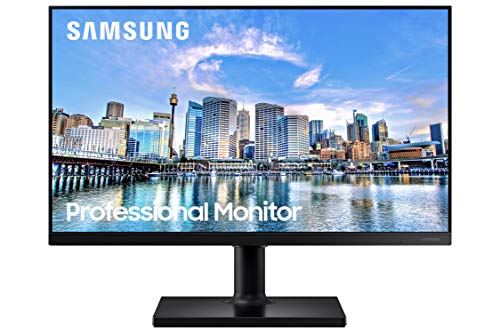
This Samsung 24-inch monitor makes the most sense for a desk that needs a clean everyday screen with a little extra speed for casual gaming and smoother scrolling. The IPS panel, 100Hz refresh rate, and slim-bezel design give it a broad, practical appeal, while the tilt-only stand keeps the hardware simple and the price in the budget lane.
Buy it if you want a straightforward 1080p monitor for work, streaming, and light gaming without paying for a more elaborate stand or creator-grade extras. Skip it if your setup depends on height adjustment, premium motion tuning, or color-critical work, because this model is built around comfort, simplicity, and value rather than a fully featured desk rig.
| Screen Size | 24 inches |
|---|---|
| Resolution | FHD 1080p |
| Panel Type | IPS |
| Refresh Rate | 100Hz |
| Aspect Ratio | 16:9 |
| Screen Surface | Glossy |
The IPS panel is the core image choice here, and it matters because it keeps colors and contrast more consistent across the screen and from different viewing angles.
That makes the monitor easier to share, easier to glance at from the side, and less fussy for everyday desk use.
The practical trade-off is that it is aimed at broad utility, not at the more demanding end of color-sensitive creative work.
The practical trade-off is that it is aimed at broad utility, not at the more demanding end of color-sensitive creative work.
The 100Hz refresh rate is the main reason this monitor feels quicker than a basic office screen.
It helps motion look smoother in games, video, and even routine desktop movement.
It is a real upgrade for comfort, but it does not turn the monitor into a high-end gaming panel.
It is a real upgrade for comfort, but it does not turn the monitor into a high-end gaming panel.
At a normal desk, the first thing that matters is whether text looks clean enough to live with all day, and this 24-inch 1080p panel lands in a sensible range for that job. At roughly 92 pixels per inch, it gives you enough workspace for browser tabs, documents, and messaging without making the screen feel cramped, and the IPS panel keeps the image steady when you shift your posture or sit off-center. The trade-off is simple: this is a practical daily screen, not a dense workspace display for people who want maximum sharpness or lots of side-by-side room.
For video, casual gaming, and fast scrolling, the 100Hz refresh rate is the feature that changes the feel of the monitor most. It cuts the stuttery, overly stiff look that a basic 60Hz panel can have, so moving through feeds, menus, and lighter games feels more fluid right away. That said, the value here is in smoothness, not in chasing competitive gaming features, so buyers who care about advanced motion tuning or a more aggressive gaming setup should look higher up the chain.
Setup is where the monitor’s personality is clearest. The tilt-only stand keeps assembly and placement uncomplicated, and the slim bezel design makes it easy to fit into a dual-monitor desk or a compact home office without visual clutter. The limitation is ergonomic rather than cosmetic: if your chair, desk, or eye line changes a lot during the day, the lack of height adjustment becomes the thing that decides whether this is a good fit or a compromise you will notice every afternoon.
Community
The recurring theme is easy to read: people like the sharp-looking image, the simple setup, and the slim bezel, while the stand is the part most likely to disappoint. The practical lesson is that this monitor earns its place when the screen itself matters more than the base it sits on.
Great picture and easy to set up.
Really good monitor. The slim bezel works well for multimonitor setups. Image is crystal clear. Vesa capability make it versatile. Would certainly recommend.
This works just fine for a monitor. The only thing I do not care for is the V shaped base, in my opinion it makes it hard to set it up on things like the printer stand I bought just for that purpose. But it is now out.
Very nice monitor. Easy to assemble even though there are no instructions in English. I am visually challenged, so I needed my wife to help me, but it was pretty simple. My only complaint is that the description says.
| Attribute | Samsung LS24D304GANXZA Current | Philips 221V8LB | SANSUI ES-24F2 | ARZOPA A1 |
|---|---|---|---|---|
| Price | $79.99 | $75.62 | $79.98 | $79.99 |
| Screen Size | 24 inches | 21.5 Inches | - | 15.6 Inches |
| Resolution | FHD 1080p | FHD 1080p | - | 1920 x 1080 |
| Panel Type | IPS | VA | - | IPS |
| Refresh Rate | 100Hz | 100 Hz | - | 60 Hz |
| Editorial score | 75/100 | 83/100 | 76/100 | 75/100 |
Against a basic 60Hz office monitor, this Samsung is the more comfortable everyday choice because the 100Hz refresh and IPS panel make motion and viewing angles feel less plain. If your main goal is documents, streaming, and light gaming on a tidy desk, it is the better-balanced route; if you only need the cheapest screen for static work, a simpler 60Hz model still makes sense.
Compared with a more adjustable office monitor such as an ASUS VA279HG-style alternative, this Samsung gives up some stand flexibility in exchange for a cleaner, simpler budget. Choose the Samsung if you care more about the panel and the price than about height tuning; choose the more adjustable route if ergonomic placement matters more than slim bezels or a smoother feel.
Compare with
Add a second model to activate the direct comparison.


No products match that filter combination.
This is a strong buy for someone who wants a clean 24-inch monitor with IPS viewing stability, 100Hz smoothness, and a simple setup at a budget-friendly level. If you check the current offer and the price stays in the same rough low-cost bracket, the value case is easy to understand for everyday work and casual entertainment.
The main reason to skip it is ergonomic flexibility, not image quality. If you need height adjustment, a more elaborate gaming feature set, or a display aimed at creator work, there are clearer alternatives; this Samsung is the better choice when you want a tidy, uncomplicated screen and can live with the tilt-only stand.
Yes. The 24-inch 1080p IPS screen is a sensible size for general desk use, with stable viewing and a clean, straightforward setup.
The stand is tilt-only, so it does not include height adjustment.